Sending the same resume to every job is quick, but it rarely gets noticed. Employers look for the skills in their own job post, and a generic resume makes them hunt for it.
This guide gives you a set of ChatGPT prompts for resume and cover letter writing. They help you sharpen your bullets, match a job post, and draft a letter in your own voice. Each one works with your real experience, so nothing gets invented.
Use the cheat sheet below as a quick reference. Then read on to see when to use each prompt and how it looks filled in.
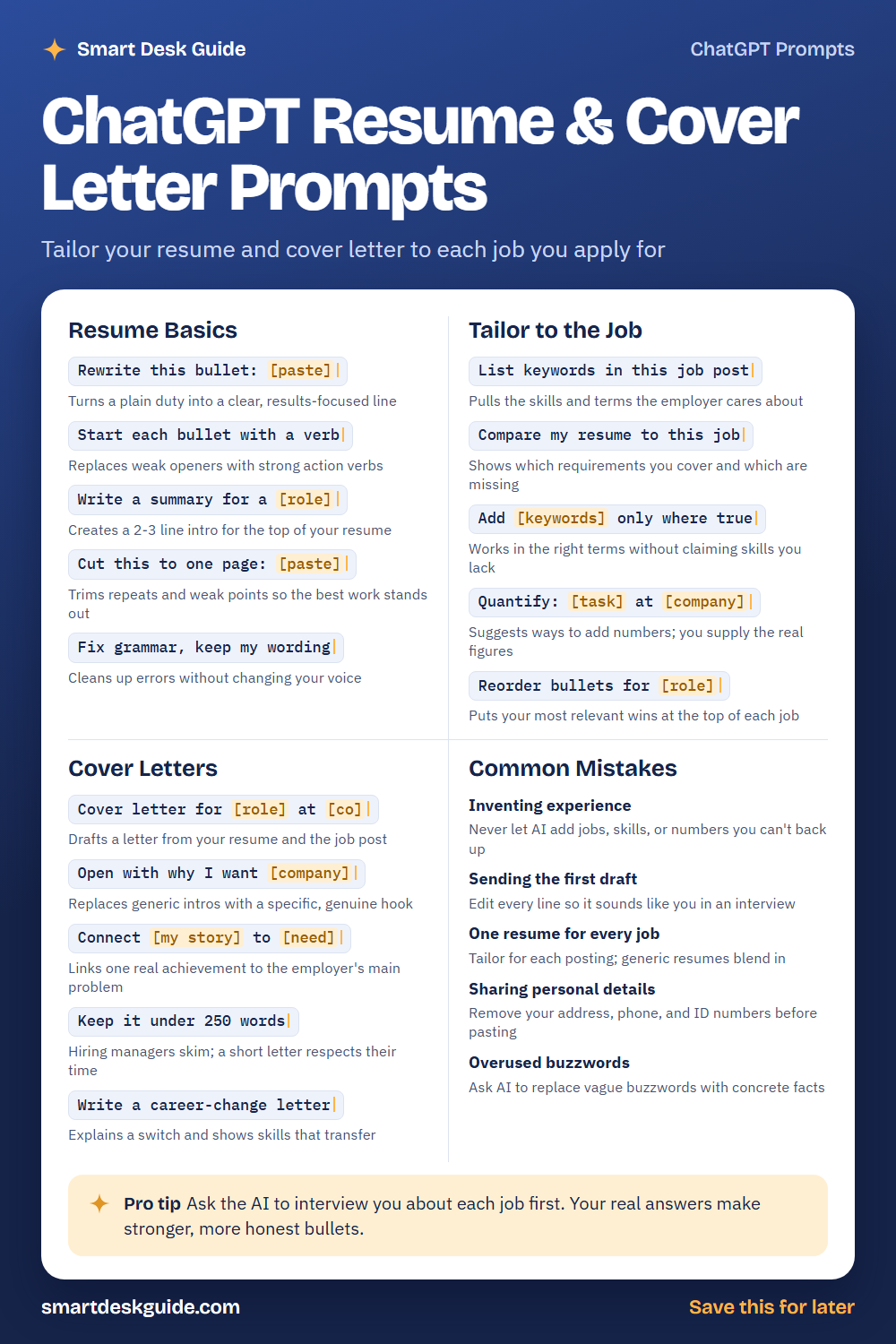
How to Use These Prompts
Words in [brackets] are blanks. Replace each one with your own details before you send the prompt.
Before: Rewrite this bullet: [paste]
After: Rewrite this bullet: Answered phone calls and booked appointments for a busy dental office.
The more real detail you give, the better the answer. Paste your actual text, name the job you want, and say what you want changed. These prompts work the same way in ChatGPT, Claude, and Gemini.
Resume Basics
Rewrite this bullet: [paste]
Many bullets list a duty instead of a result. This prompt asks the AI to show what your work actually achieved. Give it true details only, and check the new line before you keep it.
Example: Rewrite this bullet: Helped customers at the front desk of a family-owned hardware store, and trained two new hires.
Start each bullet with a verb
Weak openers like “responsible for” or “helped with” say little. Strong verbs such as “organized,” “trained,” or “reduced” show what you did. This prompt fixes the whole list in one pass.
Example: Start each bullet with a verb. Here are my bullets: Responsible for weekly inventory. In charge of the Saturday schedule.
Write a summary for a [role]
A short summary at the top tells the reader who you are in two or three lines. Give the AI your role, years of experience, and top strengths. Then trim anything that does not sound like you.
Example: Write a summary for a medical office assistant with five years of experience in scheduling, billing, and patient check-in.
Cut this to one page: [paste]
Long resumes bury your best work. This prompt trims repeated points and older, less relevant details. Ask it to explain what it removed, so you can put back anything important.
Example: Cut this to one page: Maria Lopez, Office Coordinator, 2016 to present. Managed calendars, ordered supplies, and planned team events.
Fix grammar, keep my wording
Sometimes you only need a proofread. This prompt fixes typos and grammar without rewriting your style. It helps when you like your phrasing but worry about small errors.
Example: Fix grammar, keep my wording. Managed a team of four and plan weekly schedules for the shop.
Tailor to the Job
List keywords in this job post
Job posts repeat the skills and tools the employer cares about most. This prompt pulls them into a short list. You can then check which ones truly match your background.
Example: List keywords in this job post: Seeking a bookkeeper with experience in invoicing, payroll, and monthly reports.
Compare my resume to this job
This prompt shows which requirements you already cover and which are missing. It gives you a clear picture before you spend time editing. A missing skill is not always a dealbreaker, so read the gaps with care.
Example: Compare my resume to this job. Resume: three years as a bookkeeper for a local bakery. Job: senior bookkeeper for a landscaping company.
Add [keywords] only where true
This is the safest way to use keywords. The words “only where true” tell the AI not to stretch your experience. Read every change and delete anything that is not accurate.
Example: Add invoicing and payroll only where true. If a keyword does not fit my experience, list it separately instead of adding it.
Quantify: [task] at [company]
Numbers make results easier to picture. This prompt asks the AI for ways to measure your work, such as time saved or people served. It cannot know your real figures, so you supply them.
Example: Quantify: scheduling appointments at Greenfield Dental. Suggest what I could measure and ask me for the numbers.
Reorder bullets for [role]
Put your most relevant wins first in each job. This prompt sorts your bullets by how well they fit the new role. You keep all the facts and change only the order.
Example: Reorder bullets for customer support lead. Here are my bullets: Ordered supplies. Trained new staff. Resolved customer complaints.
Cover Letters
Cover letter for [role] at [co]
Paste your resume and the job post, then ask for a first draft. It gives you a starting point instead of a blank page. Rewrite it in your own words before you send it.
Example: Cover letter for administrative assistant at Riverbend Insurance. Use my resume and the job post below.
Open with why I want [company]
Generic openers like “I am writing to apply” are easy to skip. A specific reason grabs attention. Tell the AI what you honestly like about the company, so the hook is real.
Example: Open with why I want Riverbend Insurance. I like that they focus on helping first-time homebuyers.
Connect [my story] to [need]
Pick one real achievement and link it to the employer’s main problem. This shows the reader what you can do for them. Use a story that is true and that you can talk about in an interview.
Example: Connect my work reorganizing a filing system to their need for someone who keeps records accurate.
Keep it under 250 words
Hiring managers skim. A short letter respects their time and forces you to keep only your strongest points. If the AI goes over, ask it to cut the weakest paragraph.
Example: Keep it under 250 words. Cut anything that repeats my resume.
Write a career-change letter
Switching fields can raise questions. This prompt helps explain why you are changing and which skills transfer. Be honest about what you are still learning.
Example: Write a career-change letter. I am moving from retail management to office administration. Highlight scheduling, training, and record keeping.
Common Mistakes
Inventing experience
Never let the AI add jobs, skills, or numbers you cannot back up. An employer may ask about them in an interview. Quick fix: add Use only the facts I gave you to every prompt.
Sending the first draft
AI drafts often sound polished but flat. Read each line aloud and ask yourself if you could explain it in an interview. Change anything that does not sound like you.
One resume for every job
A generic resume blends in. Tailor the top third for each posting: the summary, the skills, and the first few bullets. That small effort often matters most.
Sharing personal details
Remove your home address, phone number, and any ID numbers before you paste anything. You can add them back in your own document. Use a placeholder such as [my address] instead.
Overused buzzwords
Words like “hard-working” and “team player” say little. Try this: Replace vague buzzwords in this resume with concrete facts, and ask me questions if you need details.
Pro Tip
Ask the AI to interview you about each job before it writes anything. Your honest answers give it real material to work with, and the bullets come out stronger.
Example: Interview me about my time as a shift supervisor at a local coffee shop. Ask one question at a time, then turn my answers into resume bullets. Answer with real details, and keep the results you can stand behind.
FAQ
Can I use ChatGPT to write my resume?
Yes, as a helper. It can polish wording, suggest structure, and match your resume to a job post. You should still supply the facts and check every line, because the resume has to be accurate and sound like you.
Is it okay to use AI for a cover letter?
Many people use AI for a first draft. Rewrite it so it reflects your voice and your real reasons for wanting the job. Never send a draft you have not read closely.
How do I keep my personal information safe?
Leave out your address, phone number, and ID numbers when you paste text into an AI tool. Use placeholders and add the details back later. Also check the privacy settings of the tool you use.
Final Thoughts
AI works best as an editor, not an author. Start with your real experience, use these prompts to sharpen it, and read every line before you send it.