Staring at a great photo with no idea what to write is a common problem. You know the post matters, but the caption keeps turning into a blank page.
This guide gives you ChatGPT prompts for Instagram captions that fix that. You will get prompts for basic captions, hooks, calls to action, hashtags, and post ideas. Each one shows how to keep the result sounding like you, not like a robot.
Save the cheat sheet below for quick reference, then read on for when to use each prompt and a filled-in example.
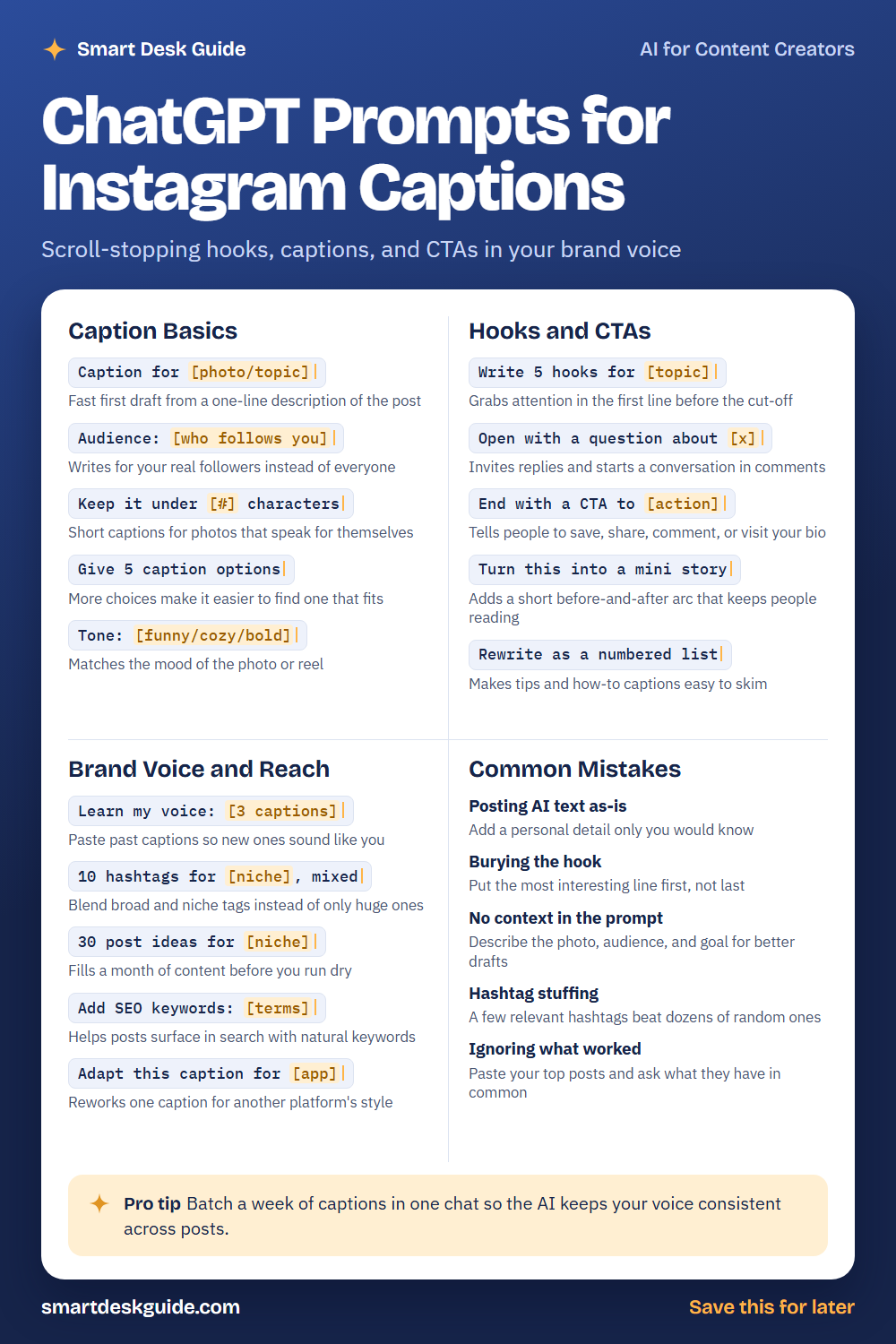
How to Use These Prompts
Words in [brackets] are blanks. Replace each one with details about your post before you send the prompt.
Before: Caption for [photo/topic]
After: Caption for a photo of a fresh loaf of sourdough on a wooden counter at a local bakery.
The more you describe the photo, your audience, and your goal, the better the draft. These prompts work in ChatGPT, Claude, and Gemini.
Caption Basics
Caption for [photo/topic]
Start here when you have a photo but no words. A one-line description is enough for a first draft. Treat the result as a starting point and edit it.
Example: Caption for a photo of a fresh loaf of sourdough on a wooden counter at a local bakery.
Audience: [who follows you]
Captions land better when they speak to real people. Tell the AI who follows you, and it will pick topics and words that fit them. Add this line to almost any prompt.
Example: Audience: busy parents who follow us for quick weeknight dinner ideas.
Keep it under [#] characters
Some photos need only a short line. Setting a limit keeps the caption tight and easy to read. If the first version runs long, ask the AI to cut it again.
Example: Keep it under 120 characters.
Give 5 caption options
One draft can feel like a take-it-or-leave-it choice. Five options let you mix and match the best lines. You can also ask the AI to label each one by style.
Example: Give 5 caption options for a photo of a new fall candle collection at a small home goods shop.
Tone: [funny/cozy/bold]
Tone sets the mood before the AI writes a word. A cozy tone suits a coffee photo, while a bold one suits a sale. Pick the tone that matches your image and brand.
Example: Tone: cozy. Caption for a rainy-day latte at a neighborhood cafe.
Hooks and CTAs
Write 5 hooks for [topic]
Only the first line shows before the “more” cut-off, so it has to earn the tap. Ask for several hooks and pick the strongest. Then build the rest of the caption around it.
Example: Write 5 hooks for a post about three easy stretches for desk workers.
Open with a question about [x]
A good question invites replies and starts a conversation in the comments. Choose one your followers can answer in a few words. Avoid questions with an obvious yes or no.
Example: Open with a question about favorite weekend breakfast spots.
End with a CTA to [action]
A call to action tells people what to do next. It might be to save the post, share it, comment, or visit the link in your bio. Pick one action so the request stays clear.
Example: End with a CTA to save this post for the next grocery trip.
Turn this into a mini story
Short before-and-after stories keep people reading. Give the AI true details and it will shape them into a small arc. Only use events that really happened.
Example: Turn this into a mini story: Our shop opened last spring with two tables, and now we have a line out the door on Saturdays.
Rewrite as a numbered list
Tips and how-to captions are easier to skim as a list. This prompt reformats a paragraph into short numbered steps. It works well for carousel posts too.
Example: Rewrite as a numbered list: Water your plants in the morning, check the soil first, and rotate the pots each week.
Brand Voice and Reach
Learn my voice: [3 captions]
Paste three of your past captions and ask the AI to describe your style. New drafts will then sound closer to you. Review the results and correct anything that feels off.
Example: Learn my voice from these 3 captions, then describe it in two sentences: "Monday coffee, Monday smiles." "New scones just landed, come say hi." "Rainy day? We saved you a warm seat."
10 hashtags for [niche], mixed
Huge hashtags are crowded, while niche ones reach a smaller but more interested group. Ask for a mix of both. Then remove any tag that does not fit the post.
Example: 10 hashtags for a local flower shop, mixed broad and niche.
30 post ideas for [niche]
Running out of ideas is a common reason to stop posting. This prompt fills a month in one go. Choose the ideas that fit your real work and skip the rest.
Example: 30 post ideas for a dog grooming studio, including behind-the-scenes and tips.
Add SEO keywords: [terms]
Instagram search reads the words in your caption. Ask the AI to work in a few natural terms people might search. Keep the sentence readable and skip the stuffing.
Example: Add SEO keywords: handmade soap, gift ideas, small business. Keep the caption natural.
Adapt this caption for [app]
One caption rarely fits every platform. This prompt reworks it for the length and style of another app. It saves you from writing the same post twice.
Example: Adapt this caption for LinkedIn: We just launched our new fall menu, and the pumpkin bread is already a favorite.
Common Mistakes
Posting AI text as-is
AI drafts can feel generic. Add one personal detail only you would know, like the smell of the shop at opening time. That small touch makes it yours.
Burying the hook
If the best line is at the end, most people will never see it. Quick fix: ask Move the most interesting line to the first sentence.
No context in the prompt
A vague request gets a vague caption. Describe the photo, your audience, and the goal. For example, say what the post is for, such as a sale or a new menu item.
Hashtag stuffing
A handful of relevant hashtags works better than dozens of random ones. Try asking for five that match the topic. Cut any that feel like a stretch.
Ignoring what worked
Your past posts hold clues. Try this: Here are my top 3 posts. What do they have in common? Then use the answer to plan your next posts.
Pro Tip
Batch a week of captions in one chat so the AI keeps your voice consistent across posts. Start by pasting your voice sample and audience, then list each day’s photo.
Example: Using my voice sample above, write one caption for each of these five photos: Monday new pastries, Tuesday team photo, Wednesday behind the scenes, Thursday customer favorite, Friday weekend hours. Review each caption before you schedule it.
FAQ
Can ChatGPT write Instagram captions?
Yes. It can draft captions, hooks, hashtags, and post ideas in seconds. You will get better results when you describe the photo, your audience, and your tone. Always edit the draft so it sounds like you.
How do I make AI captions sound less robotic?
Paste a few of your own captions and ask the AI to learn your voice. Then add one personal detail to every post. Reading the caption out loud also helps you catch stiff phrases.
How many hashtags should I use?
There is no single right number. A few hashtags that match your post are usually better than a long list of random ones. Test what works for your account and adjust.
Final Thoughts
AI can take the pain out of caption writing, but your personal touch is what makes people follow. Use these prompts to get a draft, then make it yours. Check any facts, prices, or claims before you post, and keep private customer details out of the chat.
If this guide helped, save the cheat sheet on Pinterest and bookmark this page for your next post.