Running a small business means doing a dozen jobs before lunch. AI can take some of that load, but the choices are confusing and new tools appear all the time.
This guide covers the best AI tools for small business by type, so you know what each kind does before you spend anything. You also get five prompts for everyday tasks, a checklist for picking a tool, and the mistakes to avoid.
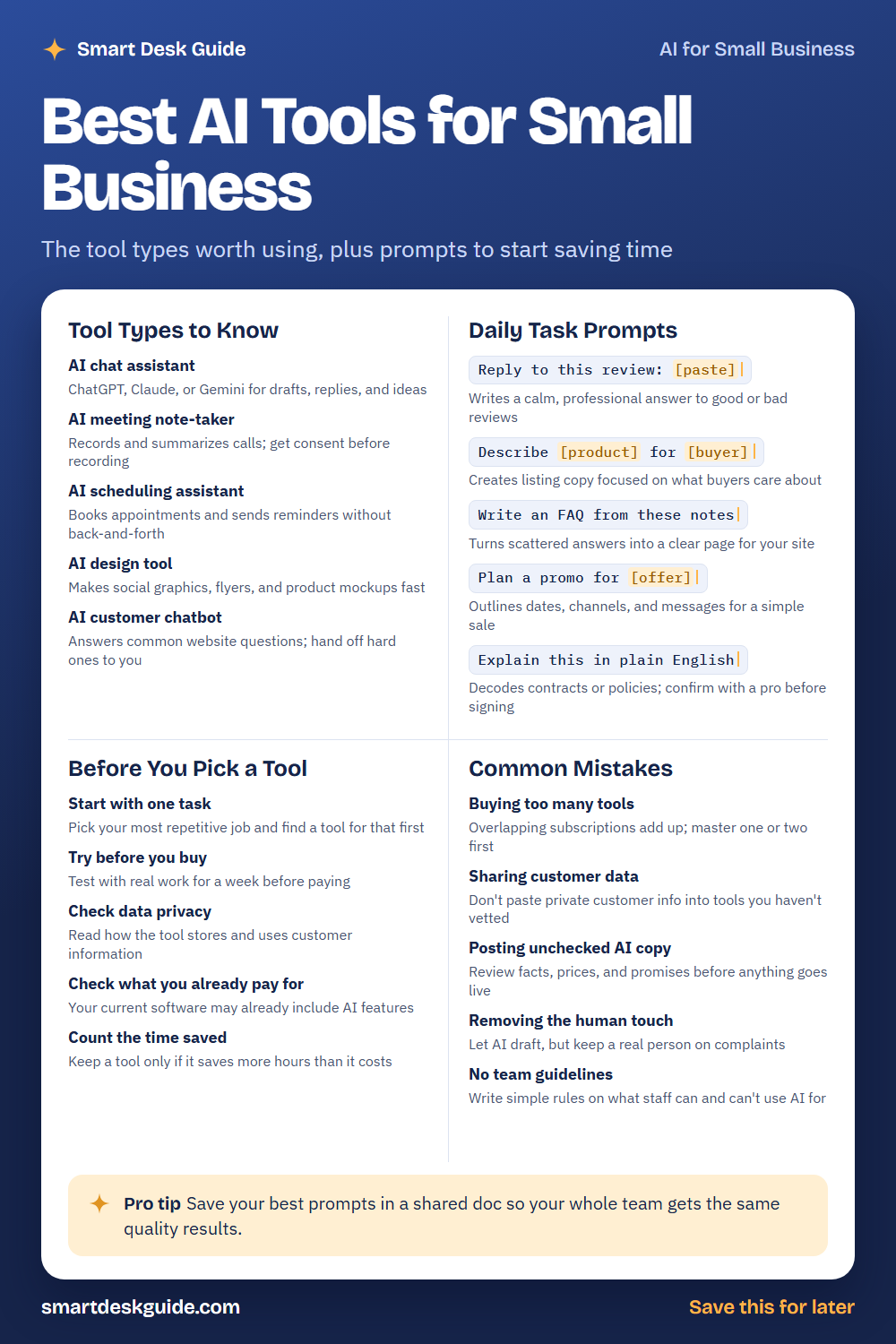
Save the cheat sheet below as a quick reference. Then read on for details and examples.
How to Use These Prompts
Words in [brackets] are blanks. Replace each one with your own details before you send the prompt.
Before: Reply to this review: [paste]
After: Reply to this review: The cookies were great, but my order was ten minutes late.
The more detail you give about your business and your customer, the better the result. The prompts work in ChatGPT, Claude, and Gemini. Keep customer names, phone numbers, and other private details out of the chat.
Tool Types to Know
AI chat assistant
A chat assistant like ChatGPT, Claude, or Gemini is the easiest place to start. It helps with drafts, replies, and ideas. Quick example: paste a rough note to a supplier and ask for a polite, shorter version.
AI meeting note-taker
These tools record calls and write summaries, so you can focus on the conversation. Always tell people you are recording and get their consent first. Rules on recording vary by place, so check the ones that apply to you.
AI scheduling assistant
Booking appointments by email can take many messages. A scheduling assistant lets clients pick a time and sends reminders for you. A hair salon or a tutoring service could save real time this way.
AI design tool
Design tools create social graphics, flyers, and product mockups from a short description. They are handy when you need a simple image fast. Always review the result for spelling and brand fit before you post.
AI customer chatbot
A chatbot can answer common website questions, like your opening hours. Set it up so harder questions go to a real person. Test it yourself by asking the questions your customers ask.
Daily Task Prompts
Reply to this review: [paste]
Good and bad reviews both deserve a calm, professional answer. This prompt drafts one in seconds. Read it, add a personal detail, and post it yourself.
Example: Reply to this review: The cookies were great, but my order was ten minutes late. Keep it warm and under 60 words.
Describe [product] for [buyer]
Listing copy works best when it focuses on what buyers care about. Tell the AI who will buy and what matters to them. Check that every claim about the product is true.
Example: Describe a hand-poured soy candle for gift shoppers who want a calm, cozy home.
Write an FAQ from these notes
You probably answer the same questions again and again. Paste your scattered answers and get a clean page for your site. Verify hours, prices, and policies before you publish.
Example: Write an FAQ from these notes: We are open Tuesday to Saturday. Orders ship within three days. Returns are accepted with a receipt.
Plan a promo for [offer]
A simple sale needs dates, channels, and messages. This prompt gives you an outline you can adjust. You still decide the real discount and the budget.
Example: Plan a promo for a two-week spring sale at a small garden shop. Include email, social posts, and in-store signs.
Explain this in plain English
Contracts and policies are full of hard wording. This prompt gives you a simple summary so you know what to ask. Confirm anything important with a professional before you sign.
Example: Explain this in plain English: The tenant shall be responsible for all repairs under $500 unless caused by structural failure.
Before You Pick a Tool
Start with one task
Pick the most repetitive job on your list and look for a tool for that job only. For example, if you spend an hour a day answering the same emails, start there. One clear win beats five half-used tools.
Try before you buy
Test a tool with real work for a week before you pay. Use it on real emails, real orders, or real posts. If it does not fit your routine, you have lost nothing.
Check data privacy
Read how the tool stores and uses customer information. Look for a privacy page and settings that let you limit sharing. If you cannot find clear answers, keep customer data out of it.
Check what you already pay for
Your email, accounting, or website software may already include AI features. Look at your current plans first. You may not need a new subscription at all.
Count the time saved
Keep a tool only if it saves more time than it costs to use. Write down how long a task took before, then after. A simple note on a calendar is enough.
Common Mistakes
Buying too many tools
Overlapping subscriptions add up quickly. Quick fix: list every tool you pay for and cancel the ones that do the same job. Master one or two first.
Sharing customer data
Do not paste private customer information into tools you have not vetted. Use placeholders like [Customer A] and add details later. This protects your customers and your business.
Posting unchecked AI copy
AI can get facts, prices, and promises wrong. Read everything before it goes live. Check opening hours, offers, and product details yourself.
Removing the human touch
Let AI draft, but keep a real person on complaints and sensitive messages. Customers can tell when nobody is listening. A quick personal note goes a long way.
No team guidelines
If your staff use AI, write down simple rules. Say what they can use it for, what they should never paste in, and who reviews the results. One short page is enough.
Pro Tip
Save your best prompts in a shared document so your whole team gets the same quality results. Add a short note next to each prompt about when to use it and what to check afterward.
For example, a bakery might keep a prompt named “Review reply” with the line: Reply to this review in a warm tone under 60 words. Mention our bakery by name. Anyone on the team can copy it, fill in the blank, and review the answer.
FAQ
What is the best AI tool for a small business?
There is no single best tool, because it depends on your work. Many owners start with a chat assistant, since it helps with writing, ideas, and planning. Test a few with your own tasks and keep the one that saves the most time.
Is it safe to use AI with customer information?
Be careful. Avoid pasting names, contact details, or payment information into tools you have not checked. Read the privacy settings, and use placeholders when you can.
Will AI replace my employees?
This guide does not predict that, but it does suggest a safe approach. Use AI to draft and organize, and keep people in charge of decisions and customer care. It works best as a helper.
Final Thoughts
You do not need every new tool. Pick one task, test one option, and measure the time saved. Keep checking the output and protecting customer data as you go.
If you found this useful, save the cheat sheet on Pinterest and bookmark this page so you can come back when you are ready to try the next tool.