You gave clear instructions, and the answer came back ignoring half of them. It was too long, the format was wrong, or it included the one thing you said to leave out.
This guide shows how to fix ChatGPT not following instructions with better prompts and a few habits. You will get prompts for writing clearer rules, correcting an answer inside the chat, and handling long conversations, plus the mistakes that cause trouble. These methods help, but no method is perfect, so you still need to review every answer.
Use the cheat sheet below as a quick reference. Then read on to see when to use each prompt and how it looks filled in.
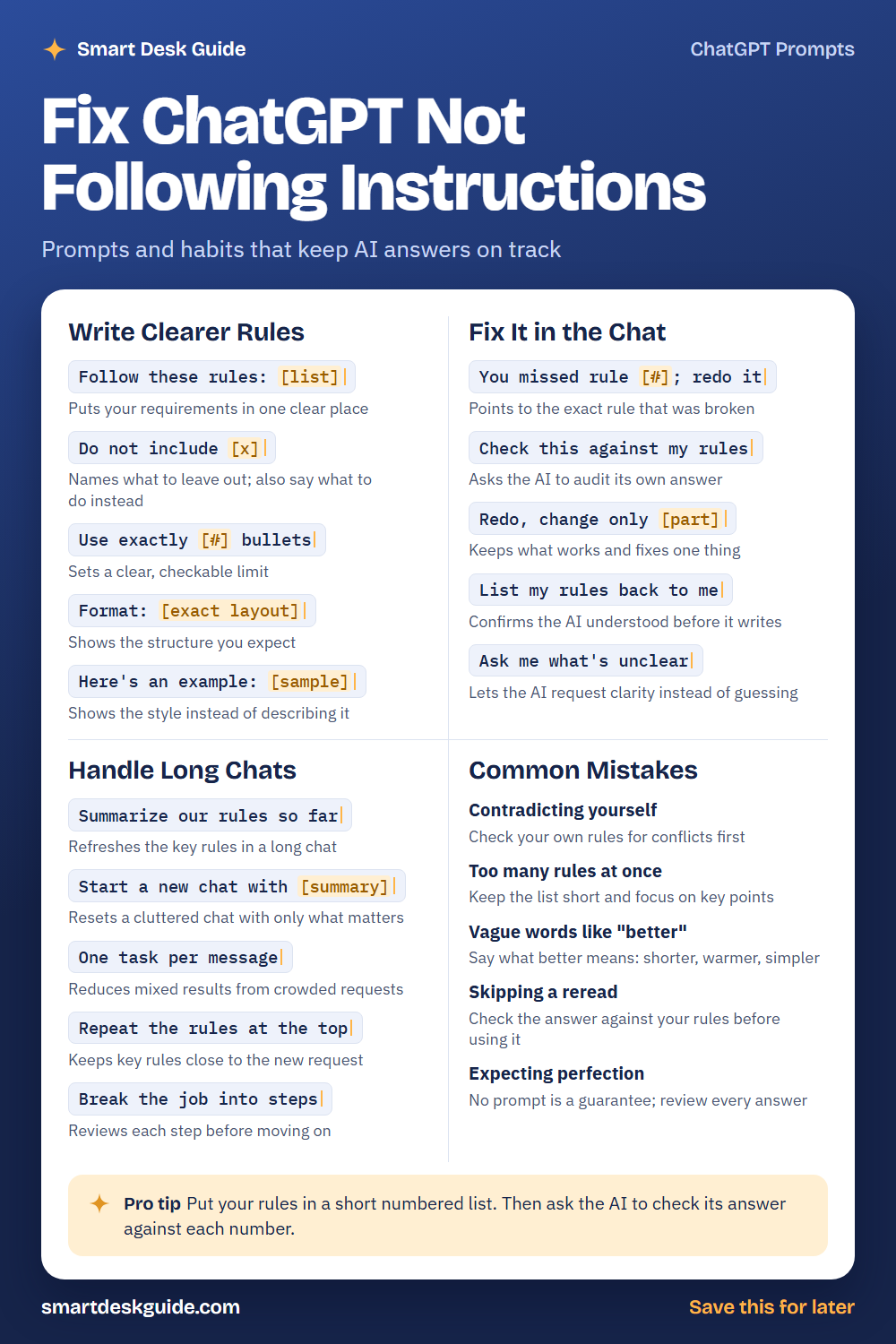
How to Use These Prompts
Words in [brackets] are blanks. Replace each one with your own details before you send the prompt.
Before: Follow these rules: [list]
After: Follow these rules: 1. Keep it under 100 words. 2. Use a friendly tone. 3. End with a question.
Numbered rules are easy to point back to later. These prompts work the same way in ChatGPT, Claude, and Gemini. Treat every answer as a draft and check it against your rules.
Write Clearer Rules
Follow these rules: [list]
Put your requirements in one clear place instead of scattering them through a long request. A short numbered list works well. Keep each rule to one idea.
Example: Follow these rules: 1. Keep it under 80 words. 2. Use plain language. 3. End with one question for the reader. Task: write a welcome message for a new book club.
Do not include [x]
Telling the AI what to leave out is useful, but it works better when you also say what to do instead. Name the item and give an alternative. This gives the AI a clear direction.
Example: Do not include jargon. Use everyday words instead when you explain how a savings account works.
Use exactly [#] bullets
Clear limits are easy to check. If you ask for exactly five bullets and get seven, you know right away that a rule was missed. Use numbers for length, bullets, and sections.
Example: Use exactly 5 bullets to summarize the main points of the meeting notes below.
Format: [exact layout]
Show the structure you expect. You can describe it in a line or draw it out. The more specific the layout, the less the AI has to guess.
Example: Format: a title on the first line, then three short paragraphs, then a one-sentence summary labeled "Takeaway."
Here’s an example: [sample]
An example often works better than a description. Paste a short sample of the style or layout you want. Then ask the AI to follow it.
Example: Here's an example: "Monday: Review emails. Tuesday: Draft report." Use the same style to write a plan for Wednesday through Friday.
Fix It in the Chat
You missed rule [#]; redo it
When an answer breaks a rule, point to the exact rule. This is clearer than saying “that’s wrong.” Keep the other parts of the answer if they were fine.
Example: You missed rule 2. Redo the answer using plain language only and keep everything else the same.
Check this against my rules
Ask the AI to review its own answer against your list. It may catch problems you missed. You should still read the result yourself.
Example: Check this against my rules and list any rule you did not follow. Then fix the answer.
Redo, change only [part]
If most of an answer is good, change only the bad part. This prevents new errors in the parts that worked. Say clearly what should stay the same.
Example: Redo, change only the last paragraph. Keep the first two paragraphs exactly as they are.
List my rules back to me
Before the AI writes, ask it to repeat your rules. This shows whether it understood them. If something is wrong, you can correct it before the long answer arrives.
Example: List my rules back to me in your own words, then wait for me to confirm before you write.
Ask me what’s unclear
Sometimes an instruction is unclear, and the AI guesses. Invite it to ask questions instead. Then answer briefly and let it continue.
Example: Ask me what's unclear about this request before you start. Keep it to three questions at most.
Handle Long Chats
Summarize our rules so far
In a long conversation, early rules can get lost or mixed up. Asking for a summary refreshes them. Correct the summary if anything is off.
Example: Summarize our rules so far in a numbered list, and I will confirm or fix them.
Start a new chat with [summary]
When a chat becomes cluttered, start fresh with only what matters. Paste a short summary of your rules and goal. A clean start often works better than adding more messages.
Example: Start a new chat with this summary: we are writing a short newsletter for a neighborhood garden club, friendly tone, under 150 words.
One task per message
A message with five tasks tends to get mixed results. Send one task at a time, and review it before the next. It takes longer to send, but it is easier to fix.
Example: One task per message. First, write only the subject line for our garden club newsletter.
Repeat the rules at the top
Put your key rules at the top of a new request. This keeps them close to the task. It is a simple habit that helps in many chats.
Example: Rules: plain language, under 100 words, no jargon. Task: explain what compost is.
Break the job into steps
A big job is easier to control in steps. Ask for an outline first, then each part, then a final polish. Review each step before moving on.
Example: Break the job into steps: first an outline for a short report, then the introduction, then the findings.
Common Mistakes
Contradicting yourself
If one rule says “be brief” and another says “cover everything in detail,” the AI has to choose. Read your rules for conflicts before you send them. Quick fix: remove or rank the conflicting rule.
Too many rules at once
A long list can be hard to follow. Keep the rules short and focus on the key points. Add more later if needed.
Vague words like “better”
“Make it better” does not say how. Say what better means, such as shorter, warmer, or simpler. A clear target leads to a clearer result.
Skipping a reread
Check the answer against your rules before you use it. It takes a minute and can catch missed instructions. Do not assume the AI followed everything.
Expecting perfection
No prompt guarantees a perfect answer. Plan to review and adjust. If something still goes wrong, correct it in the chat.
Pro Tip
Put your rules in a short numbered list. Then ask the AI to check its answer against each number, and fix anything it missed.
Example: Here are my 4 rules. Check your answer against each rule by number, say yes or no for each one, and fix any no.
FAQ
Why does ChatGPT ignore my instructions?
There are several possible reasons. The instruction may be unclear, it may conflict with another one, or the request may be crowded with many tasks. Clearer, shorter rules usually help, but the AI can still miss one.
Do negative instructions work?
They can, but they work better when you add what to do instead. Telling the AI what to leave out gives it less to go on than telling it what you want. Check the answer either way.
Should I start a new chat?
Sometimes. If a long chat has become cluttered or the AI keeps drifting, a fresh chat with a short summary of your rules can help. Keep the summary simple.
Final Thoughts
You cannot force an AI to follow every instruction every time, but you can make instructions easier to follow. Write clear, short rules, check the answer, and correct it in the chat. Keep private information out of the chat.
If this guide helped, save the cheat sheet on Pinterest and bookmark this page for the next time an answer misses the mark.