Posting regularly is hard when every post starts from zero. You open the app, wonder what to say, and end up skipping a day or posting something rushed.
This guide gives you ChatGPT prompts for content calendar planning so you decide once and post all month. You will get prompts to set a strategy, build the calendar, write and schedule posts, and avoid the mistakes that make a plan hard to follow.
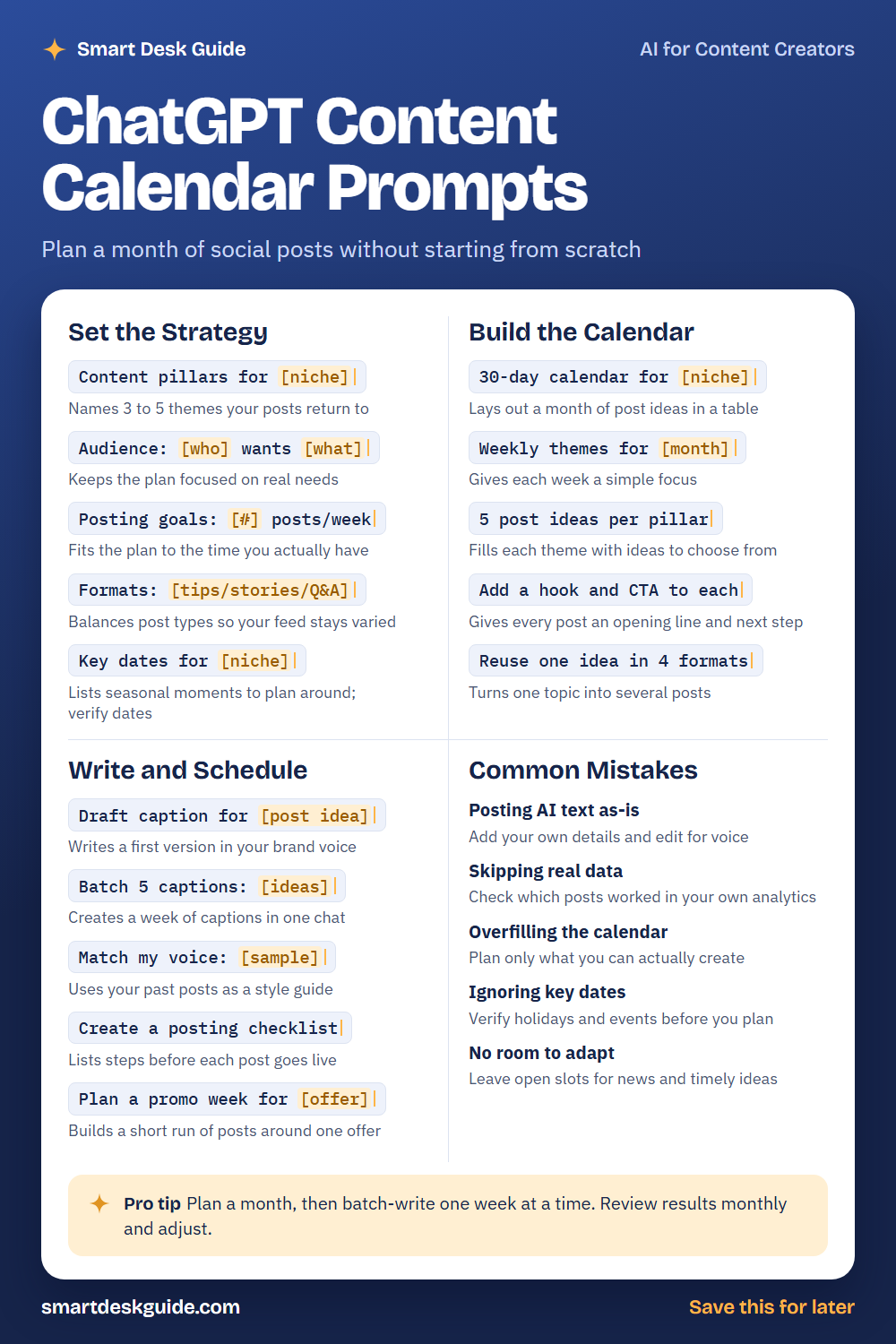
Use the cheat sheet below as a quick reference. Then read on to see when to use each prompt and how it looks filled in.
How to Use These Prompts
Words in [brackets] are blanks. Replace each one with your own details before you send the prompt.
Before: Content pillars for [niche]
After: Content pillars for a small neighborhood bakery that sells bread, pastries, and custom cakes.
The more you say about your audience, your offer, and your time, the more useful the calendar. These prompts work the same way in ChatGPT, Claude, and Gemini. Treat every idea as a draft, and edit each post so it sounds like you.
Set the Strategy
Content pillars for [niche]
Content pillars are the main themes your posts return to. They keep your feed focused and make ideas easier to find. Ask for three to five pillars and pick the ones that match your goals.
Example: Content pillars for a small neighborhood bakery that sells bread, pastries, and custom cakes. Give me 4.
Audience: [who] wants [what]
A calendar works best when it speaks to real needs. Describe who follows you and what they want from your posts. Use what you already know from comments and messages.
Example: Audience: busy parents who want easy treats for school events and weekend breakfasts.
Posting goals: [#] posts/week
Be honest about how much you can create. Tell the AI how many posts you can make each week and fit the plan to that number. A smaller, steady plan beats a big one you abandon.
Example: Posting goals: 3 posts/week, with about 2 hours total to create them.
Formats: [tips/stories/Q&A]
A feed with only one type of post can feel repetitive. List the formats you are willing to make, and ask the AI to balance them. Skip any you do not have the time or tools for.
Example: Formats: tips, behind-the-scenes stories, and customer Q&A. Mix them across the month.
Key dates for [niche]
Seasonal moments give you a reason to post. The AI may get dates wrong, so treat the list as ideas and verify each date yourself. Add local events you know about.
Example: Key dates for a neighborhood bakery in the fall. List holidays and seasonal moments to consider, and I will verify the dates.
Build the Calendar
30-day calendar for [niche]
A table with a month of post ideas gives you a starting map. Ask for columns like date, pillar, idea, and format. Move things around to fit your schedule.
Example: 30-day calendar for a neighborhood bakery as a table with columns for day, pillar, post idea, and format. Plan 3 posts per week.
Weekly themes for [month]
A theme for each week keeps the month organized. It also makes it easier to write a series of connected posts. Pick themes that match your pillars.
Example: Weekly themes for October for a neighborhood bakery, with a simple focus for each week.
5 post ideas per pillar
A list of ideas for each pillar fills your calendar with options. Choose the ones you can make well. Replace any that feel generic.
Example: 5 post ideas per pillar for these pillars: baking tips, behind the scenes, customer favorites, and seasonal treats.
Add a hook and CTA to each
A hook is the opening line, and a CTA is the next step you want readers to take. Ask the AI to add both to each idea. Keep the CTA simple, like saving or commenting.
Example: Add a hook and CTA to each of these post ideas: a day in the bakery, a sourdough tip, and a customer cake story.
Reuse one idea in 4 formats
One idea can become several posts. This prompt turns a single topic into different formats, such as a tip, a story, a question, and a short list. It saves time and keeps your message consistent.
Example: Reuse one idea in 4 formats: how to store fresh bread so it stays good longer.
Write and Schedule
Draft caption for [post idea]
Give the AI a post idea and ask for a first draft in your style. Add details only you know, such as a real customer comment. Edit until it sounds like you.
Example: Draft caption for a post about our new pumpkin loaf. Friendly tone, under 80 words, end with a question.
Batch 5 captions: [ideas]
Writing a week of captions in one session saves effort. Paste five ideas and ask for five captions. Review each one before you schedule it.
Example: Batch 5 captions: Monday new pastry, Tuesday baking tip, Wednesday behind the scenes, Thursday customer favorite, Friday weekend hours.
Match my voice: [sample]
Paste a few of your past captions and ask the AI to follow that style. Use only your own writing as the sample. Read the result aloud to check that it sounds like you.
Example: Match my voice: "Fresh loaves are out. Come early, they go fast." "Rainy day? Warm rolls fix most things." Write a caption for our new rye bread.
Create a posting checklist
A checklist helps you avoid missed details. Ask for steps to complete before each post goes live, such as checking spelling, adding a call to action, and choosing hashtags. Adjust it to your workflow.
Example: Create a posting checklist with 6 steps to do before I publish a post for the bakery.
Plan a promo week for [offer]
A promotion needs a mix of posts leading up to it. Ask for a short run of posts around one offer. You set the terms of the offer, and the AI helps with the rest.
Example: Plan a promo week for a "buy a dozen cookies, get a small treat" weekend special, with five posts over seven days.
Common Mistakes
Posting AI text as-is
AI drafts can sound generic. Add your own details, such as a real customer comment or a photo story. Quick fix: change at least one line in every caption.
Skipping real data
Your own results show what your audience likes. Check which posts got the most saves or comments in your analytics. Use that to adjust the calendar.
Overfilling the calendar
A calendar you cannot keep up with is worse than a small one. Plan only what you can actually create. You can always add more later.
Ignoring key dates
A holiday post that arrives late misses the moment. Verify holidays and events before you plan around them. Check local dates in particular.
No room to adapt
Things change, and a calendar with no flexibility breaks. Leave open slots for news, trends, and customer questions. A flexible plan is easier to follow.
Pro Tip
Plan a month, then batch-write one week at a time. Review results monthly and adjust, so the calendar improves instead of staying fixed.
Example: Here are the results from last month: tips posts got the most saves, and story posts got the most comments. Adjust next month's calendar to lean on both.
FAQ
Can ChatGPT make a content calendar?
Yes. Give it your niche, audience, and posting goals, and it can draft a calendar with themes and ideas. You should edit it to fit your voice, your time, and real dates.
How far ahead should I plan?
Many creators plan a month at a time. Choose a window you can handle, and leave room for changes. You can always plan the next month later.
How do I keep AI captions sounding like me?
Paste samples of your own writing and ask the AI to follow them. Then add a personal detail to each caption. Reading the post aloud helps you catch lines that do not sound like you.
Final Thoughts
A content calendar takes pressure off each day because you have already decided what to say. Use these prompts to plan, draft, and adjust. Check dates and facts, and keep private customer information out of the chat.
If you want the full prompt pack for planning content, get it here: Get the prompt pack here