If you’ve tried to settle the ChatGPT vs Claude vs Gemini question by reading reviews, you’ve probably found a lot of strong opinions and very little you can use. One person swears by one tool, and the next person says it’s the worst. The truth is that all three are capable AI assistants, and the “best” one depends on the work you actually do.
This guide skips the hype. You’ll see what the three tools have in common, get five test prompts you can run side by side, learn a simple way to score the results, and avoid the mistakes that lead people to pick the wrong tool.
Use the cheat sheet below as your quick reference, then read each section for examples you can copy. By the end, you’ll have a repeatable test you can run again whenever these tools change.
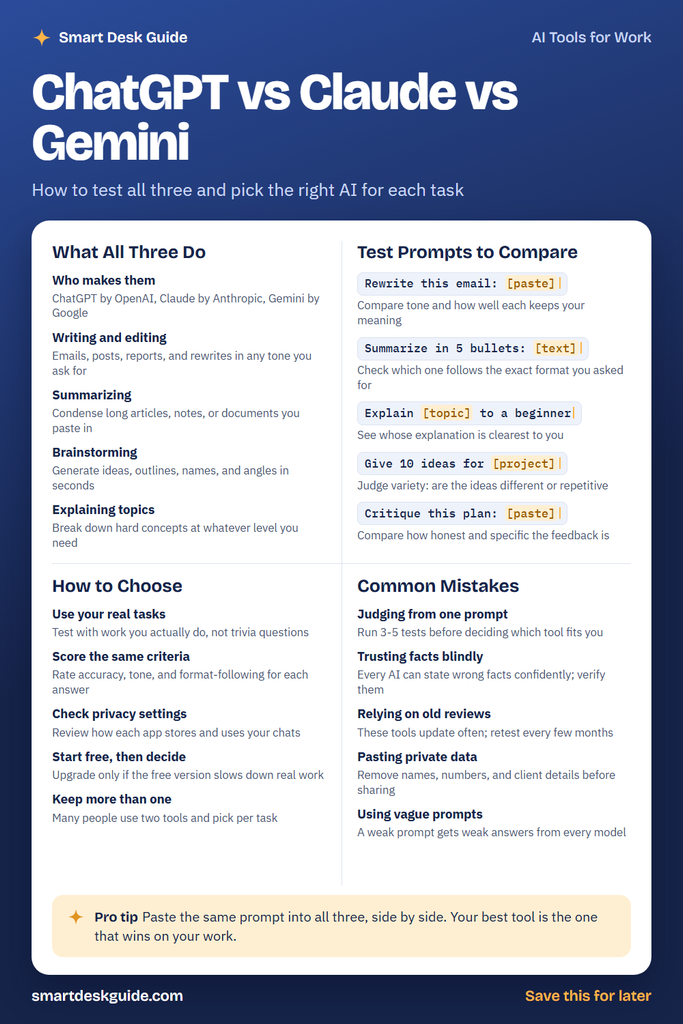
How to Use These Prompts
Every prompt in this guide has words in [square brackets]. Those are blanks. Replace them with your own details before you paste the prompt into ChatGPT, Claude, or Gemini.
For example, the template Explain [topic] to a beginner becomes Explain how compound interest works to a beginner. The more specific you make each blank, the more useful the answer will be.
For a fair comparison, paste the exact same filled-in prompt into all three tools. If you change the wording between tools, you’re no longer comparing apples to apples.
What All Three Do
Before you compare, it helps to know how much these tools overlap. All three can handle the everyday tasks below, so your decision will come down to which one handles them best for you.
Who makes them
ChatGPT is made by OpenAI, Claude by Anthropic, and Gemini by Google. Each company builds its own AI models, so the same question can come back with different wording, structure, and detail.
Example: Ask all three the same question, and one might answer with a short list while another writes full paragraphs. Neither is wrong. One simply fits the way you like to read.
Writing and editing
All three can draft emails, social posts, reports, and rewrites in almost any tone you ask for. Most people start here, and it’s where differences in voice are easiest to notice.
Example: Take a stiff paragraph from a work update and paste it in after this prompt: Make this paragraph sound friendlier without changing any facts. Then ask yourself which version you’d actually send.
Summarizing
Each tool can condense long articles, meeting notes, or documents you paste in. Summaries save time, but they can also leave out details that matter to you.
Quick fix: Tell the tool what to keep. A prompt like Summarize this project update and keep every deadline and dollar amount protects the details you care about most.
Brainstorming
When you’re stuck, all three can generate ideas, outlines, names, and angles in seconds. Not every idea will be good, but a long list gives you something to react to.
Example: A local bakery owner could try Give me 15 name ideas for a fall pastry menu at a small neighborhood bakery, pick two favorites, and ask for more ideas like those.
Explaining topics
All three can break down a hard concept at whatever level you need. You can keep asking follow-up questions until it makes sense.
Example: Try Explain how a 401(k) employer match works like I'm starting my first job, then ask what questions to bring to HR. Double-check anything financial against your actual plan documents.
Test Prompts to Compare
These five prompts each test a different skill. Run every prompt in all three tools, using a fresh chat each time, and keep the answers side by side.
Rewrite this email: [paste]
This prompt tests tone and accuracy at the same time. A good rewrite sounds better but keeps every fact and request from your original.
Example: Rewrite this email: Hi team, the client moved the launch up a week, so we need final designs by Friday. Let me know if that's a problem.
Summarize in 5 bullets: [text]
This prompt shows which tool follows instructions exactly. Count the bullets. If you asked for five and got seven, that tells you something about how closely the tool listens.
Example: Summarize in 5 bullets: our HR team's two-page remote work policy, pasted below
Explain [topic] to a beginner
This prompt tests clarity. The best answer is the one that makes sense to you on the first read, with no jargon left unexplained.
Example: Explain how a credit score is calculated to a beginner
Give 10 ideas for [project]
This prompt tests creativity and variety. Scan the list for repeats. Ten ideas that are really three ideas reworded won’t help you much.
Example: Give 10 ideas for a spring fundraiser for a small animal shelter
Critique this plan: [paste]
This prompt tests honesty. Some answers lean on praise, while others point out real weak spots. The critical answer is usually more useful before you commit time or money.
Example: Critique this plan: Alex wants to start a weekly email newsletter for his landscaping business, send it every Monday, and fill it with seasonal lawn tips and one coupon.
How to Choose
Once you have your results, these steps help you make a fair decision instead of going with your gut.
Use your real tasks
Trivia questions won’t tell you much about how a tool handles your job. Test with the emails, reports, and plans you actually write each week.
Example: A teacher should test with a parent newsletter and a lesson outline, not a question like “What’s the capital of Australia?”
Score the same criteria
Rate every answer on the same three things: accuracy, tone, and how well it followed your format. A simple 1-to-5 score for each keeps you from favoring whichever answer you read last.
Example: Maria scores each tool’s email rewrite, then adds up the totals across all five tests. The tool with the highest total becomes her starting pick.
Check privacy settings
Each app has its own settings for how your chats are stored and used. Look these up before you paste in anything work-related.
Quick fix: Open the settings or privacy page in each tool and look for options about chat history and data use. If your employer has an AI policy, follow that first.
Start free, then decide
Each tool offers a free version, so you can try all three before you spend anything. Use the free version on real work first, and upgrade only if it’s actually slowing you down.
Quick fix: Before you pay, write down one specific thing the free version couldn’t do for you. If you can’t name one, you probably don’t need to upgrade yet.
Keep more than one
You don’t have to pick a single winner. Many people keep two tools and switch between them based on the task.
Example: You might use one tool for drafting emails and another for summarizing long documents, simply because each one did better on that test.
Common Mistakes
These are the most common ways people end up with the wrong tool, or get worse results than they should from any of them.
Judging from one prompt
One great or terrible answer can be luck. Run three to five different tests before you decide.
Quick fix: Use the five test prompts above as your standard set, so every tool faces the same tasks.
Trusting facts blindly
Every AI tool can state wrong facts with total confidence, and some will even make up sources. This is true no matter which one you pick.
Quick fix: Check names, numbers, dates, and quotes against a trusted source before you use them in anything important.
Relying on old reviews
These tools update often, so an older comparison may no longer be accurate. A tool that struggled with a task before might handle it well now, or the other way around.
Quick fix: Set a calendar reminder to rerun your five test prompts every few months.
Pasting private data
It’s easy to paste a whole email thread or client file without thinking. That can expose names, account numbers, and confidential details.
Quick fix: Swap real details for placeholders before you paste. For example, change “Jordan Lee, account 48213” to “[client name], [account number]” and fill the real details back in afterward.
Using vague prompts
If your prompt is vague, every tool will give you a vague answer, and your comparison won’t show real differences. Specific prompts produce answers worth comparing.
Example: Instead of Write a post about my business, try Write a friendly 100-word Facebook post announcing that our bakery now opens at 7 a.m. on weekdays.
Pro Tip
The fastest way to compare is to open all three tools in side-by-side browser tabs and paste the same prompt into each one. Reading the answers next to each other, instead of hours apart, keeps your judgment consistent.
For example, a freelance designer named Sam could paste the same client email into all three tabs, pick the rewrite he’d actually send, and note the winner. After five real tasks, the tool that won most often is his best choice, even if a review somewhere says otherwise.
FAQ
Which AI is best: ChatGPT, Claude, or Gemini?
There isn’t one best AI for everyone. Each tool does better on some tasks than others, and all three change with updates. The most reliable answer comes from testing them on your own work.
Can I use ChatGPT, Claude, and Gemini for free?
Each tool offers a free way to get started, with paid plans that add more. What’s included changes over time, so check each product’s official site for current details before you decide.
Is it safe to put work information into an AI chatbot?
It depends on each tool’s settings and your employer’s rules. As a habit, keep confidential, personal, and client information out of AI tools, and check your company’s AI policy before using them for work.
Final Thoughts
Choosing an AI assistant is easier than it looks. Run the same prompts, score the answers the same way, and trust your own results over anyone else’s ranking. Retest every few months, and feel free to keep two tools for different jobs.
Save the cheat sheet to your Pinterest board so it’s ready the next time you compare, and bookmark this page to come back to the full examples.