Planning a trip can take longer than the trip itself. There are dozens of tabs open, a long list of places, and no clear order for any of it.
This guide gives you ChatGPT travel planning prompts that turn that pile into a plan. You will get prompts to draft an itinerary, fine-tune it, prepare before you leave, and avoid the mistakes that cause stress on the road.
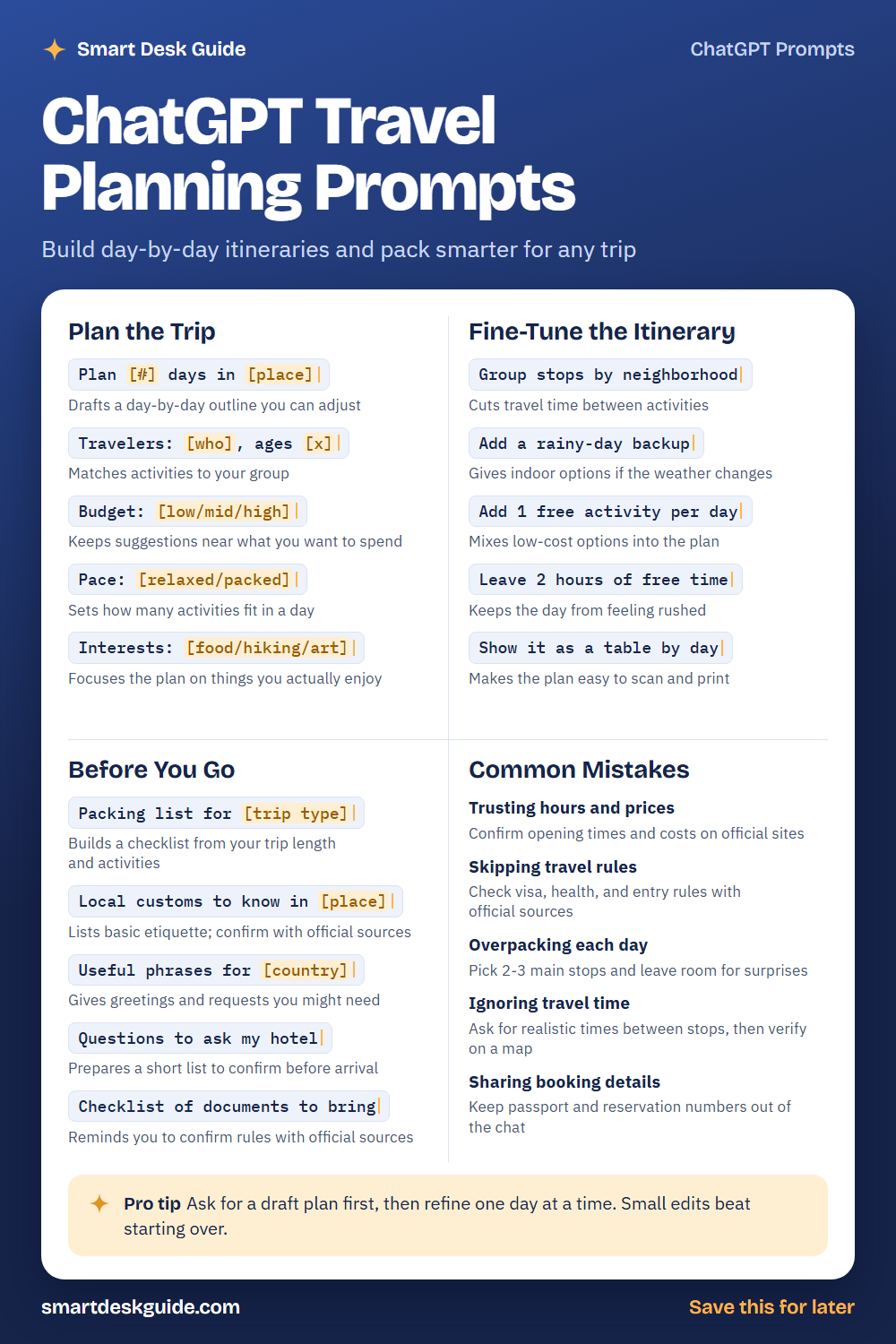
Use the cheat sheet below as a quick reference. Then read on to see when to use each prompt and how it looks filled in.
How to Use These Prompts
Words in [brackets] are blanks. Replace each one with your own details before you send the prompt.
Before: Plan [#] days in [place]
After: Plan 4 days in Lisbon for two adults who like food and walking.
The more you share about your group, budget, and interests, the better the plan. These prompts work the same way in ChatGPT, Claude, and Gemini. Treat every plan as a first draft, and confirm details before you book.
Plan the Trip
Plan [#] days in [place]
Start with the basics: how long you have and where you are going. The AI will draft a day-by-day outline. You can then adjust each day to fit your taste.
Example: Plan 5 days in Kyoto for two adults who like temples, food, and quiet walks.
Travelers: [who], ages [x]
A trip for two adults is different from a trip with young children. Tell the AI who is coming so it can match the activities. Include mobility needs if they matter.
Example: Travelers: two adults and one child, ages 34, 36, and 7.
Budget: [low/mid/high]
A budget level keeps suggestions in a range you are comfortable with. Prices change often, so treat any numbers as rough. Check current costs on official sites.
Example: Budget: mid. Suggest places to eat and things to do that are not too expensive.
Pace: [relaxed/packed]
Some people love a full schedule, and others want time to wander. This line tells the AI how many activities fit in one day. Choose the pace you will still enjoy on day four.
Example: Pace: relaxed. No more than two planned activities per day.
Interests: [food/hiking/art]
A plan built on your interests feels personal. List two or three things you enjoy and one thing you want to skip. This keeps the AI from filling days with generic sights.
Example: Interests: street food, museums, and short hikes. Skip shopping.
Fine-Tune the Itinerary
Group stops by neighborhood
Zigzagging across a city wastes time. This prompt puts nearby places on the same day. Check a map to confirm the distances are realistic.
Example: Group stops by neighborhood so each day stays in one area of Barcelona.
Add a rainy-day backup
Weather can change your plans. A backup list gives you indoor ideas without stopping to search. Ask for one backup for each outdoor day.
Example: Add a rainy-day backup for each outdoor activity in this plan.
Add 1 free activity per day
Free activities can balance a costly day. Parks, walking tours, and neighborhoods often cost little. Confirm that each one is open to the public.
Example: Add 1 free activity per day to this 4-day Chicago plan.
Leave 2 hours of free time
An over-scheduled trip feels like work. Empty blocks let you rest, shop, or follow a surprise. Ask the AI to put the free time in the afternoon.
Example: Leave 2 hours of free time each afternoon in this itinerary.
Show it as a table by day
A table is easy to scan and print. Ask for columns like morning, afternoon, and evening. Copy it into a notes app to have it offline.
Example: Show it as a table by day with columns for morning, afternoon, and evening.
Before You Go
Packing list for [trip type]
A checklist saves you from packing at the last minute. Give the trip length, activities, and the season. Then remove or add anything based on your own habits.
Example: Packing list for a 5-day city trip in fall with light walking and one nice dinner.
Local customs to know in [place]
Basic etiquette makes travel smoother, such as greetings, tipping habits, and dress. The AI may miss local details, so confirm with official tourism or government sources.
Example: Local customs to know in Japan for a first-time visitor.
Useful phrases for [country]
A few local phrases go a long way. Ask for greetings, thanks, and simple requests with a pronunciation guide. Check anything important with a trusted source.
Example: Useful phrases for Italy: greetings, ordering food, and asking for directions.
Questions to ask my hotel
A short list prepares you for check-in. It might include check-in time, luggage storage, and breakfast hours. Confirm the answers with the hotel itself.
Example: Questions to ask my hotel before arriving late at night.
Checklist of documents to bring
Use this as a reminder, not as a rulebook. Entry rules change, so confirm requirements with official sources. Keep copies of important documents in a safe place.
Example: Checklist of documents to bring for an international trip, with a reminder to confirm rules officially.
Common Mistakes
Trusting hours and prices
AI may give old or incorrect opening times and costs. Confirm hours, tickets, and prices on official sites before you go. Quick fix: add a “check official site” note next to each stop.
Skipping travel rules
Visa, health, and entry rules differ by country and change over time. Look them up on official government sources well before your trip. Do not rely on a chat answer.
Overpacking each day
Too many stops leave you tired and rushed. Pick two or three main stops per day and leave room for surprises. For example, say Limit each day to 3 main activities.
Ignoring travel time
Places that look close on paper can take a long time to reach. Ask for realistic travel times between stops, then verify them on a map app.
Sharing booking details
Keep passport numbers, reservation codes, and payment details out of the chat. Use general terms such as my hotel or my flight instead.
Pro Tip
Ask for a draft plan first, then refine one day at a time. Small edits are faster than starting over, and you keep the parts you like.
Example: Keep days 1 and 3 as they are. Rewrite day 2 with fewer stops and add a long lunch.
FAQ
Can ChatGPT plan a whole trip?
It can draft a plan, suggest activities, and build checklists. It cannot book anything for you, and its details may be out of date. Use it for ideas, then confirm the facts yourself.
Is it safe to share my travel plans with AI?
Keep private details out. Skip passport numbers, booking codes, and your home address. General information about the destination and your interests is enough to get useful ideas.
How do I make my itinerary less rushed?
Tell the AI your pace and ask for free time each day. Limit the number of main stops, and ask for realistic travel times between them.
Final Thoughts
AI is a handy planning partner, but it cannot replace official sources. Use these prompts to build a draft, refine it, and confirm the details that matter. Then enjoy the trip with fewer surprises.
If this guide helped, save the cheat sheet on Pinterest and bookmark this page for your next trip.