Most bloggers know the feeling of an empty page. You have a topic, but no angle, no outline, and no idea how to start the first paragraph.
This guide gives you ChatGPT prompts for blog posts that cover each step of the writing process. You will get prompts to find ideas, outline and draft a post, edit it, and avoid the mistakes that make AI-assisted posts sound flat or contain errors.
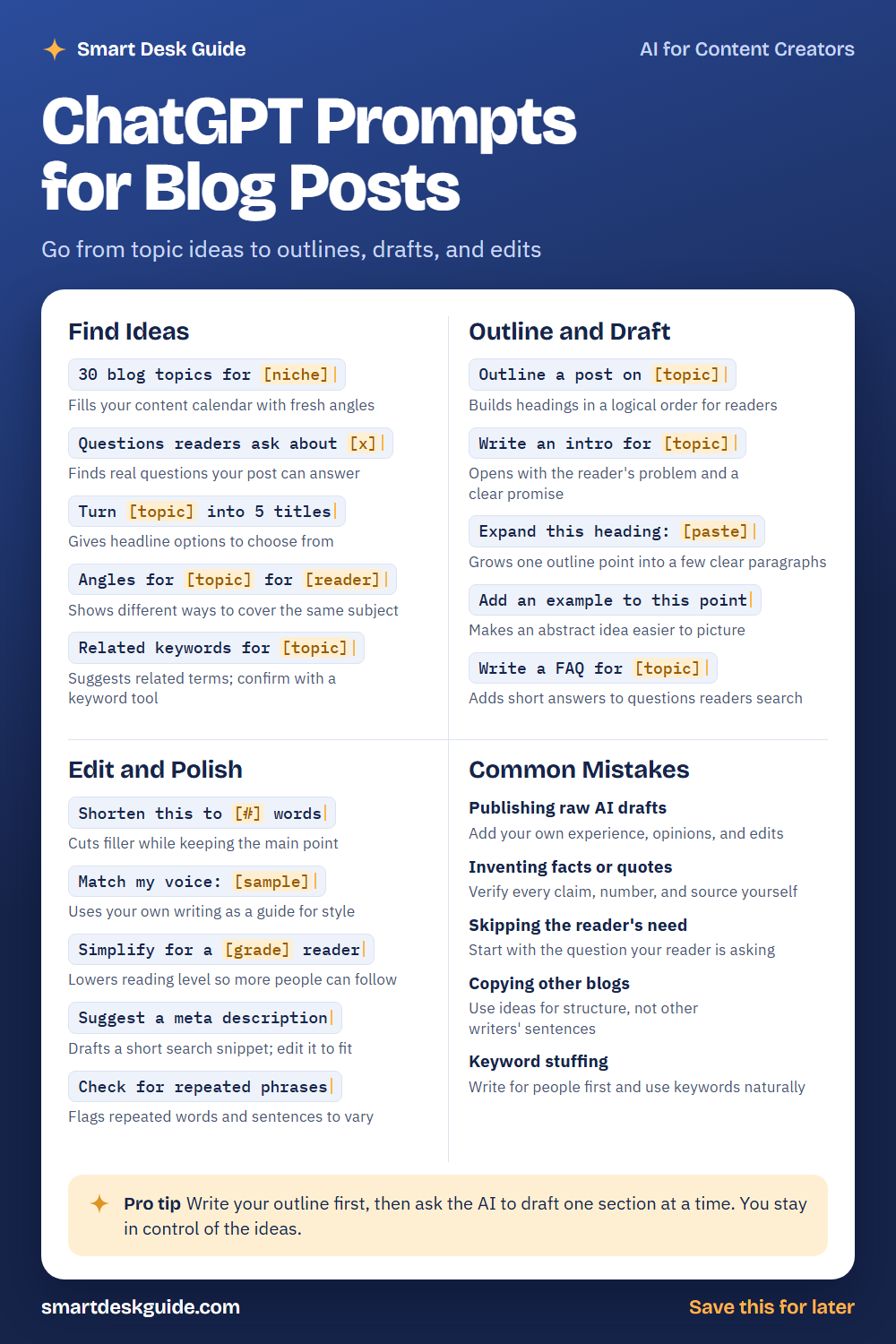
Use the cheat sheet below as a quick reference. Then read on to see when to use each prompt and how it looks filled in.
How to Use These Prompts
Words in [brackets] are blanks. Replace each one with your own details before you send the prompt.
Before: 30 blog topics for [niche]
After: 30 blog topics for a beginner gardening blog.
The more you say about your readers and goals, the better the ideas. These prompts work the same way in ChatGPT, Claude, and Gemini. Treat every result as a draft that you will shape, fact-check, and rewrite in your own voice.
Find Ideas
30 blog topics for [niche]
A long list is a good starting point when you feel stuck. Ask for topics grouped by reader problem. Then circle the ones you can write about from real knowledge.
Example: 30 blog topics for a small blog about budget-friendly home cooking, grouped by beginner, intermediate, and time-saving.
Questions readers ask about [x]
Posts that answer real questions tend to be more helpful. This prompt lists questions a beginner might ask. Check them against search suggestions and reader comments.
Example: Questions readers ask about starting a vegetable garden on a small balcony.
Turn [topic] into 5 titles
A good title is clear and honest. Ask for several options and pick one that matches what the post really delivers. Avoid titles that promise more than the post can give.
Example: Turn "how to organize a small home office" into 5 titles under 60 characters.
Angles for [topic] for [reader]
The same topic can be covered in many ways, such as a checklist, a beginner guide, or a common-mistakes post. This prompt shows you options. Choose the one that fits your reader.
Example: Angles for meal prep for busy college students.
Related keywords for [topic]
The AI can suggest related terms and phrases readers might search. These are guesses, so confirm them with a keyword tool before you build a post around them. Use them naturally.
Example: Related keywords for a post about composting at home for beginners.
Outline and Draft
Outline a post on [topic]
An outline keeps the post in order. Ask for headings that follow the reader’s questions. Rearrange or remove anything that does not fit.
Example: Outline a post on how to start a compost bin, with headings a beginner would search for.
Write an intro for [topic]
A strong intro names the reader’s problem and promises a clear answer. Ask for two versions and mix the best lines. Then add a detail from your own experience.
Example: Write an intro for a post on choosing a first houseplant. Start with the problem of plants dying, keep it to 3 short paragraphs.
Expand this heading: [paste]
When one outline point feels thin, ask for a few paragraphs. Give the AI notes about what you want to say. Then rewrite so it matches your knowledge.
Example: Expand this heading: Water your plants less often than you think. Add two practical tips and keep it under 120 words.
Add an example to this point
Abstract advice is hard to picture. An example makes it real. Ask for a fictional example and replace it with a true one when you have it.
Example: Add an example to this point: Batch your cooking on Sunday to save time during the week.
Write a FAQ for [topic]
A short FAQ answers extra questions and helps readers who skim. Ask for three to five questions with brief answers. Check each answer for accuracy.
Example: Write a FAQ for a post about starting a vegetable garden, with 4 questions and 2-sentence answers.
Edit and Polish
Shorten this to [#] words
Long paragraphs lose readers. This prompt trims filler while keeping your main point. Compare the short version to the original so nothing important disappears.
Example: Shorten this to 80 words: Composting is something that many people find helpful because it allows you to reduce your household waste while also creating good soil.
Match my voice: [sample]
Paste a few paragraphs you wrote and ask the AI to follow that style. It works best with a real sample. Read the result aloud to see if it sounds like you.
Example: Match my voice: I keep things simple. I write short sentences, I say what I mean, and I add a joke when I can. Now rewrite the paragraph below in that style.
Simplify for a [grade] reader
Clear writing helps more people. Ask the AI to lower the reading level of a complex section. Keep the terms that readers need to know.
Example: Simplify for an eighth grade reader: Soil pH influences the availability of nutrients to plant roots.
Suggest a meta description
A meta description is the short snippet that can show up in search results. Ask for a few options under 155 characters. Edit them so they describe your post honestly.
Example: Suggest a meta description under 155 characters for a post called "How to Start a Compost Bin."
Check for repeated phrases
AI drafts often repeat the same words and sentence patterns. This prompt finds them. Change the flagged parts yourself so the post reads naturally.
Example: Check for repeated phrases in this paragraph and suggest ways to vary them: It is important to water. It is important to feed. It is important to wait.
Common Mistakes
Publishing raw AI drafts
Readers and search engines value posts that show real knowledge. Add your own experience, opinions, and edits before you publish. Quick fix: add one personal detail to every section.
Inventing facts or quotes
AI can state made-up facts and quotes with confidence. Verify every claim, number, and source yourself. If you cannot confirm it, cut it.
Skipping the reader’s need
A post that ignores the reader’s question will not help. Start with the problem your reader is trying to solve. For example, ask What is the reader trying to do, and what do they need first?
Copying other blogs
Use ideas for structure, but do not copy other writers’ sentences. Write in your own words. This keeps your post original and fair to other creators.
Keyword stuffing
Repeating a keyword again and again reads badly. Write for people first, and use keywords where they fit. If a sentence sounds odd out loud, rewrite it.
Pro Tip
Write your outline first, then ask the AI to draft one section at a time. You stay in control of the ideas, and each section is easier to check and rewrite.
Example: Here is my outline. Draft only section 2, "Choose the right container," in about 150 words, and wait for my notes before moving on.
FAQ
Can I use ChatGPT to write blog posts?
Yes, as a helper. It can suggest ideas, outlines, and draft sections. You should add your own knowledge, check the facts, and edit for your voice before you publish.
Will readers know a post was written with AI?
Flat, generic writing is easy to spot. Adding your own examples and opinions makes a post more useful and more personal. Always be honest about anything you present as your experience.
How long should a blog post be?
It depends on the topic. Cover what your reader needs without padding. A clear, complete post is better than a long one filled with filler.
Final Thoughts
AI can speed up the hard parts of blogging, like getting started and tightening a draft. Your knowledge and voice are what make a post worth reading. Use these prompts to save time, and check every fact before you hit publish.
If you want the full prompt pack for blogging, get it here: [GUMROAD PRODUCT LINK]