A newsletter is a promise to show up. Every week or month, you need a topic, an opening that holds attention, a subject line that gets opened, and enough energy to do it again.
This guide gives you ChatGPT prompts for newsletters that make each of those steps easier. You will get prompts to plan an issue, write the content, craft subject lines and sends, and avoid mistakes that cost you readers’ trust.
Use the cheat sheet below as a quick reference. Then read on to see when to use each prompt and how it looks filled in.
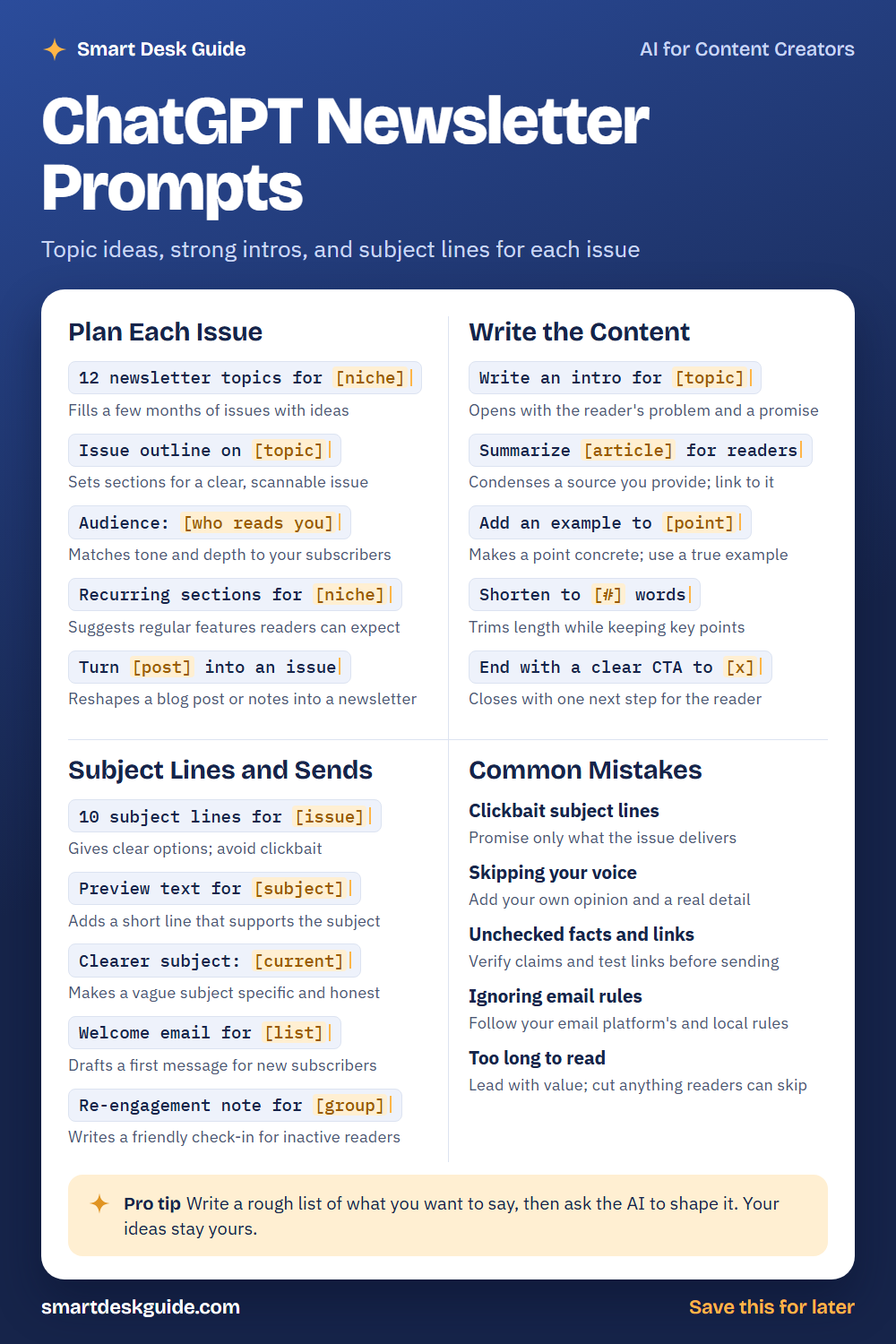
How to Use These Prompts
Words in [brackets] are blanks. Replace each one with your own details before you send the prompt.
Before: 12 newsletter topics for [niche]
After: 12 newsletter topics for a weekly newsletter about budget-friendly weekend travel.
The more you share about your readers and your goals, the better the ideas. These prompts work the same way in ChatGPT, Claude, and Gemini. Treat every draft as a starting point, add your own voice, and check facts and links before you send.
Plan Each Issue
12 newsletter topics for [niche]
A list of topics makes it easier to plan ahead. Ask for ideas based on problems your readers have, then pick the ones you can write about with real knowledge. Save the rest for later.
Example: 12 newsletter topics for a weekly newsletter about budget-friendly weekend travel, based on questions readers might ask.
Issue outline on [topic]
A simple outline helps readers scan. Ask for a few sections and a clear order. Adjust the sections to fit your usual format.
Example: Issue outline on packing light for a weekend trip, with an intro, three tips, and a closing question.
Audience: [who reads you]
Tell the AI who subscribes so the tone and depth fit. A newsletter for new travelers needs different explanations than one for frequent flyers. Add this line to almost any prompt.
Example: Audience: first-time travelers in their twenties and thirties who want weekend trips without spending much.
Recurring sections for [niche]
Regular features give readers something to look forward to and make writing easier. Ask for a few ideas for repeating sections, such as a quick tip or a reader question. Pick the ones you can keep up.
Example: Recurring sections for a weekend travel newsletter, such as a quick tip, a reader question, and a small find of the week.
Turn [post] into an issue
You may already have blog posts or notes that could become a newsletter. This prompt reshapes them into a shorter, more personal issue. Add a fresh detail so it feels new to readers.
Example: Turn this post into an issue under 300 words: Five ways to save on a weekend train trip, from booking early to packing snacks.
Write the Content
Write an intro for [topic]
A good intro names the reader’s problem and promises something useful. Give the AI your topic and a short note about what you want to say. Add a detail from your own experience.
Example: Write an intro for an issue about packing light for a weekend trip. Start with the problem of overpacking and keep it under 70 words.
Summarize [article] for readers
You can summarize a source you read, as long as you link to it and keep the summary in your own words. Paste the text and ask for a short summary. Check the result against the original.
Example: Summarize this article for readers in three sentences, using only what is written: A city has added a free shuttle between the train station and the old town on weekends.
Add an example to [point]
An example makes advice easier to follow. Ask for one and replace it with a true example from your own life if you have one. Do not present invented examples as real.
Example: Add an example to this point: Book accommodation early for a better choice of rooms.
Shorten to [#] words
Long issues can lose readers. This prompt trims the text while keeping your main points. Compare the shorter version with the original.
Example: Shorten to 250 words: paste the full draft of an issue about weekend travel tips.
End with a clear CTA to [x]
A call to action tells readers what to do next. Choose one, such as replying, clicking a link, or sharing the issue. Keep it simple.
Example: End with a clear CTA to reply with their favorite weekend trip, in a friendly tone.
Subject Lines and Sends
10 subject lines for [issue]
Subject lines decide whether people open. Ask for several options with different angles. Pick the one that is clear and honest about the issue.
Example: 10 subject lines for an issue about packing light for a weekend trip, each under 50 characters.
Preview text for [subject]
Preview text is the short line shown next to the subject in many inboxes. It should add something to the subject, not repeat it. Ask for a few options.
Example: Preview text for the subject "Pack light, travel happy," under 90 characters.
Clearer subject: [current]
Vague subjects get ignored. Paste your current subject and ask for a clearer, more specific version that stays honest. Test a few over time and see what your readers prefer.
Example: Clearer subject: "Some thoughts this week". The issue is about three small ways to save on weekend train tickets.
Welcome email for [list]
A welcome email sets the tone for new subscribers. Ask for a short, warm message that says what to expect and how often. Add one useful link or tip.
Example: Welcome email for new subscribers of a weekly budget travel newsletter. Explain what to expect and invite them to reply.
Re-engagement note for [group]
Some subscribers stop opening your emails. A friendly check-in can bring back readers who are still interested. Keep it polite and make it easy to unsubscribe.
Example: Re-engagement note for subscribers who have not opened the last five issues. Keep it kind and offer an easy way to unsubscribe.
Common Mistakes
Clickbait subject lines
A subject that promises too much hurts trust when the issue does not deliver. Promise only what the issue offers. Quick fix: ask Make this subject more honest and specific.
Skipping your voice
Readers subscribe to you. If every issue sounds generic, they may drift away. Add your own opinion, a real story, or a detail only you would know.
Unchecked facts and links
AI can state wrong facts, and links can break. Verify claims and test every link before you send. Send yourself a test copy and click through it.
Ignoring email rules
Email has rules about consent, unsubscribing, and sender information, and they vary by place. Follow your email platform’s guidelines and any local rules. When in doubt, check an official source.
Too long to read
Readers skim. Lead with value and cut anything they can skip. A short issue that gets read beats a long one that does not.
Pro Tip
Write a rough list of what you want to say, then ask the AI to shape it. Your ideas stay yours, and the draft comes together faster.
Example: Here are my rough notes for this week's issue. Turn them into a short, friendly newsletter in my voice, and do not add facts I did not mention.
FAQ
Can ChatGPT write a newsletter for me?
It can draft sections, intros, and subject lines. You should add your own ideas, check facts, and edit for voice. Readers subscribe to you, so the personal touch matters.
How do I come up with newsletter topics?
Start with your readers’ questions and your own experience. Ask the AI for ideas based on those, then choose topics you can write about well. Keep a running list of ideas.
How often should I send a newsletter?
Choose a schedule you can keep. Consistency matters more than frequency. Tell your readers what to expect, then stick to it.
Final Thoughts
AI can help you plan and draft faster, but a newsletter works because readers trust a real person. Use these prompts to get started, add your own voice, and check every fact and link. Keep private subscriber information out of the chat.
If you want the full prompt pack for newsletters, get it here: Get the prompt pack here