You ask ChatGPT for a short note and get something that sounds like a press release. The words are correct, but nobody talks like that, and you would never send it as written.
This guide shows you how to make ChatGPT sound more human with better prompts. You will get prompts to give the AI context, fix robotic phrases, add your own voice, and handle the most common problems with quick fixes.
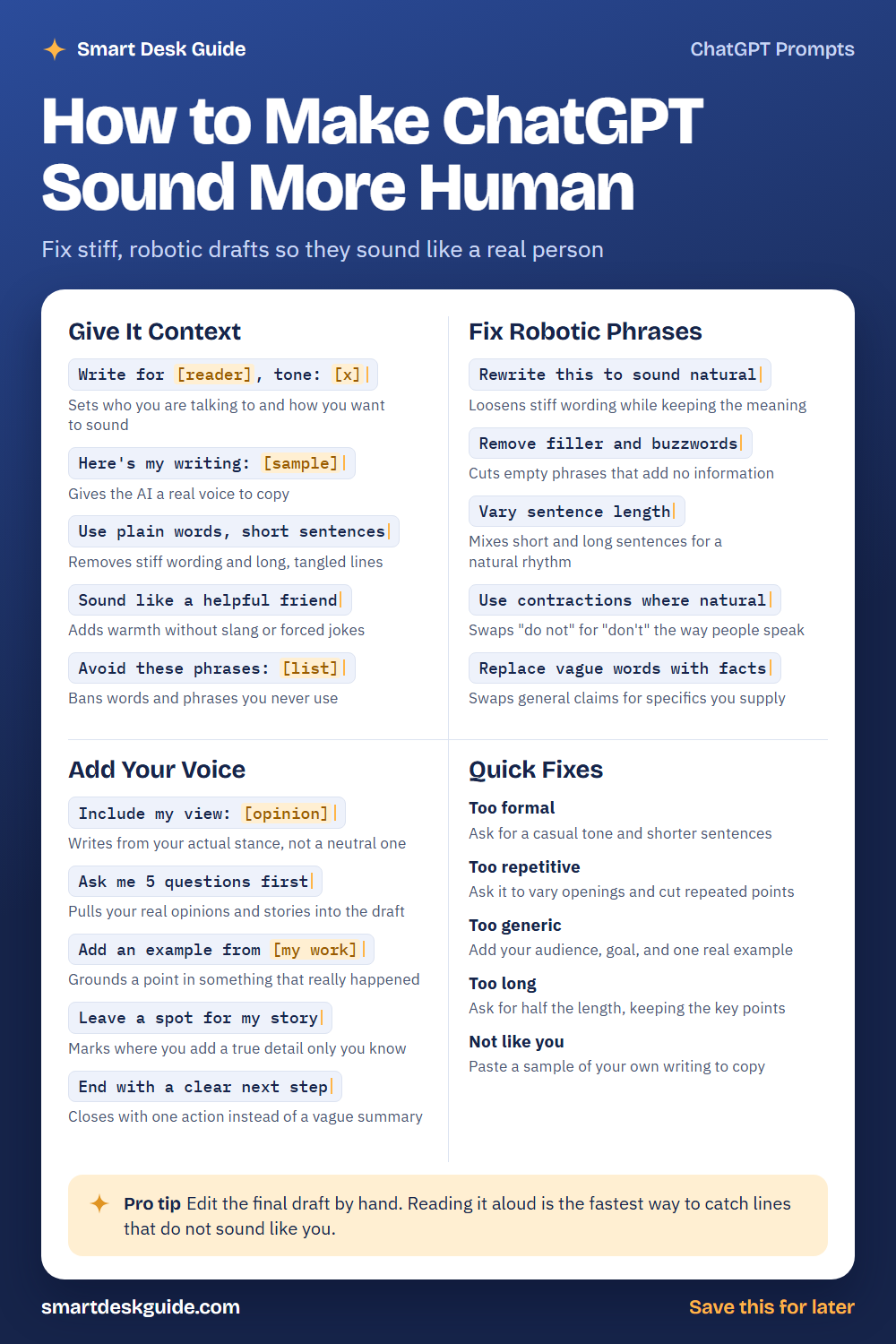
Use the cheat sheet below as a quick reference. Then read on to see when to use each prompt and how it looks filled in.
How to Use These Prompts
Words in [brackets] are blanks. Replace each one with your own details before you send the prompt.
Before: Write for [reader], tone: [x]
After: Write for busy parents who follow our bakery, tone: warm and simple.
The more the AI knows about your reader, your goals, and your style, the less generic the draft will be. These prompts work the same way in ChatGPT, Claude, and Gemini. No prompt can replace your own edit, so plan to read and revise every draft.
Give It Context
Write for [reader], tone: [x]
Generic drafts come from generic prompts. Telling the AI who will read the text and how it should sound changes the word choice right away. Pick tone words that you would use yourself.
Example: Write for busy parents who follow our bakery, tone: warm and simple. Announce a new weekend menu.
Here’s my writing: [sample]
The fastest way to get your voice is to show it. Paste a few paragraphs you wrote and ask the AI to follow that style. Use only your own writing as the sample.
Example: Here's my writing: "I keep it simple. We bake early, we sell out fast, and we love when you tell us what you want next." Use this style to write a short post about our new rye bread.
Use plain words, short sentences
Stiff writing often comes from long sentences and fancy words. This line pushes the AI toward everyday language. It also makes drafts easier to read on a phone.
Example: Use plain words, short sentences. Rewrite this announcement about our new opening hours.
Sound like a helpful friend
A friendly voice feels natural without slang or forced jokes. This prompt adds warmth while staying polite. Pair it with a reader description so the tone matches your audience.
Example: Sound like a helpful friend giving advice to someone starting their first vegetable garden.
Avoid these phrases: [list]
Every writer has words they never use. List the phrases that make AI drafts sound stiff or salesy. The AI will steer around them, though you should still scan the result.
Example: Avoid these phrases: "think outside the box," "at the end of the day," "moving forward," and "take it to the next level."
Fix Robotic Phrases
Rewrite this to sound natural
When you already have a stiff draft, ask for a rewrite. The AI will loosen the wording while keeping the meaning. Compare it with the original to make sure no facts changed.
Example: Rewrite this to sound natural: We are pleased to inform you that your order has been processed and will be dispatched shortly.
Remove filler and buzzwords
Filler phrases add words but no information. This prompt cuts them. Ask the AI to show what it removed so you can judge each change.
Example: Remove filler and buzzwords from this paragraph, and list the phrases you cut: Our innovative, cutting-edge solutions leverage synergy to deliver value.
Vary sentence length
Text where every sentence has the same length sounds mechanical. Mixing short and long sentences creates a natural rhythm. Read the result aloud to check it.
Example: Vary sentence length in this paragraph. Keep a few short sentences for emphasis.
Use contractions where natural
People say “don’t,” not “do not,” in most casual speech. Contractions make writing feel relaxed. Skip them in formal documents where they do not fit.
Example: Use contractions where natural in this email to a friend about meeting for coffee.
Replace vague words with facts
Vague claims like “great quality” say very little. Give the AI the specifics, and ask it to swap vague words for real details. Only add facts you know are true.
Example: Replace vague words with facts in this sentence, using these details: handmade in small batches, three flavors, ready in two days. Sentence: We offer great quality treats fast.
Add Your Voice
Include my view: [opinion]
Neutral writing sounds like nobody wrote it. Tell the AI your real opinion and let it build the paragraph around it. Only use views you actually hold.
Example: Include my view: I think short emails are more respectful of people's time. Write a paragraph about email habits.
Ask me 5 questions first
Instead of guessing, let the AI interview you. Your answers supply the real stories and opinions that make a draft feel personal. Answer one at a time and in your own words.
Example: Ask me 5 questions first about my experience running a weekend farmers market stall, then write a short intro using my answers.
Add an example from [my work]
An example from real work grounds a point in something that happened. Give the AI a true detail and ask it to include it. Do not let it invent one.
Example: Add an example from my work as a tutor: a student who finally understood fractions after we used pizza slices.
Leave a spot for my story
If you do not have a story ready, ask the AI to mark where one belongs. You add a true detail only you know. This keeps the text honest and personal.
Example: Leave a spot for my story in this blog post about learning to cook, and mark it with the word STORY.
End with a clear next step
Many AI drafts end with a vague summary. A clear next step feels more helpful. Pick one action, such as replying, saving, or trying something.
Example: End with a clear next step: invite readers to try the recipe this weekend and reply with how it went.
Quick Fixes
Too formal
If the draft sounds like a legal notice, ask for a casual tone and shorter sentences. Quick fix: add Write it like I'm talking to a coworker.
Too repetitive
Repeated openings and ideas make a draft feel flat. Ask the AI to vary how sentences begin and cut repeated points. Then read the draft for patterns.
Too generic
A generic draft needs more detail. Add your audience, your goal, and one real example. The more specific the input, the more specific the output.
Too long
AI drafts often run long. Ask for half the length and tell it which key points to keep. Short, clear writing sounds more natural.
Not like you
If the draft does not sound like you, paste a sample of your own writing and ask the AI to copy that style. Then edit by hand until it fits.
Pro Tip
Edit the final draft by hand. Reading it aloud is the fastest way to catch lines that do not sound like you, and it takes only a minute.
Example: Here is my draft. Mark any sentence that sounds stiff when read aloud and suggest a more natural version of each.
FAQ
Why does ChatGPT sound so robotic?
Short or vague prompts lead to generic answers. Without context about your reader, tone, and goals, the AI falls back on a neutral, formal style. More detail in the prompt usually helps.
Is it okay to use AI writing as my own?
It depends on the rules of your school, workplace, or platform. Follow those rules, and be honest about how you use AI. When you share something under your name, make sure it reflects your real views and facts.
Can I get ChatGPT to write exactly like me?
It can get closer when you share samples of your own writing. It will not match you perfectly, so plan to edit. The more of your real voice and stories you add, the better.
Final Thoughts
Better prompts lead to better drafts, but the most human part of any piece of writing is you. Give the AI context, add your own stories, and edit by hand. Check facts, and keep private information out of the chat.
If this guide helped, save the cheat sheet on Pinterest and bookmark this page for your next draft.