Deciding what to cook every night is tiring. By the time you decide, you are hungry and the easiest option is takeout.
This guide gives you ChatGPT meal planning prompts that take care of the planning. You will get prompts to build a weekly menu, write a grocery list, cut food waste, and avoid the common mistakes. Everything here works as a starting point that you can adjust for your own household.
Use the cheat sheet below as a quick reference. Then read on to see when to use each prompt and how it looks filled in.
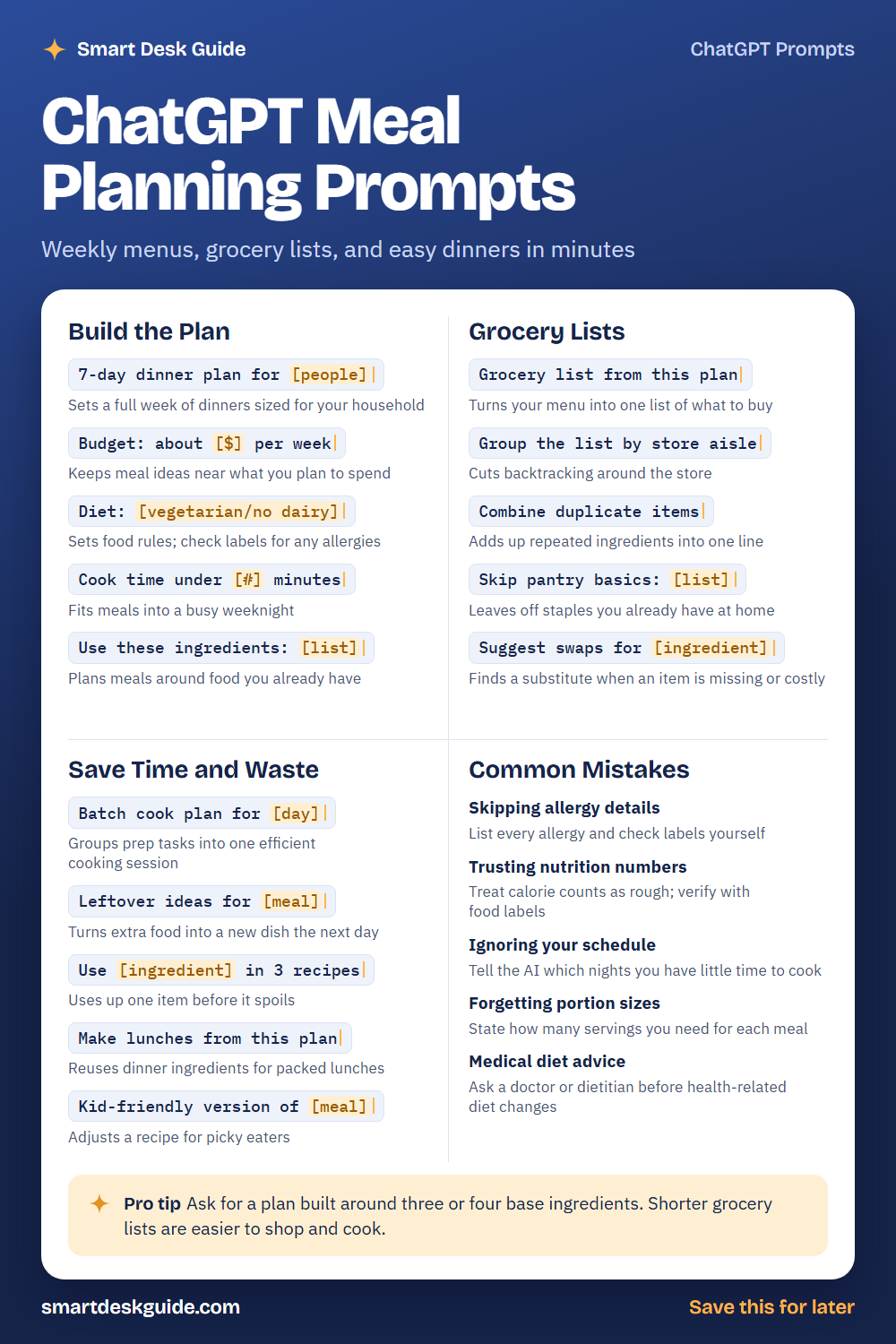
How to Use These Prompts
Words in [brackets] are blanks. Replace each one with your own details before you send the prompt.
Before: 7-day dinner plan for [people]
After: 7-day dinner plan for two adults and one toddler.
The more you share about your household, schedule, and tastes, the better the plan. These prompts work the same way in ChatGPT, Claude, and Gemini.
Build the Plan
7-day dinner plan for [people]
Start here when you need a full week of ideas. Tell the AI who you are cooking for and how many nights you need. Then swap out any meal you do not like.
Example: 7-day dinner plan for a family of four with two school-age kids.
Budget: about [$] per week
A budget keeps ideas realistic. Give a rough amount for groceries, but remember that prices vary by store and place. Treat the totals as a guide and compare them with your local prices.
Example: Budget: about $90 per week for dinners for two adults.
Diet: [vegetarian/no dairy]
Use this line to set food rules, like vegetarian, gluten-free, or no dairy. Always check labels and recipes yourself for allergies. The AI can miss hidden ingredients.
Example: Diet: vegetarian, no nuts. Plan five dinners for the week.
Cook time under [#] minutes
Weeknights are short on time. Setting a time limit keeps the plan doable. If a recipe runs longer, ask for a faster version.
Example: Cook time under 30 minutes for every dinner, including prep.
Use these ingredients: [list]
Cooking with what you already own saves money and waste. List the food in your fridge and pantry. Then ask for meals that use them up first.
Example: Use these ingredients: chicken thighs, rice, broccoli, canned tomatoes, and half an onion.
Grocery Lists
Grocery list from this plan
Once the menu is set, turn it into a shopping list. Paste the plan and ask for every ingredient in one place. Compare the list to your pantry before you shop.
Example: Grocery list from this plan: Monday chicken stir-fry, Tuesday veggie tacos, Wednesday pasta with tomato sauce.
Group the list by store aisle
A list sorted by section saves you from walking back and forth. Ask for groups like produce, dairy, and canned goods. You can also tell the AI the order your store uses.
Example: Group the list by store aisle: produce, dairy, meat, canned goods, and frozen.
Combine duplicate items
Several recipes may call for the same ingredient. This prompt adds them up into one line. Check the totals, since the math can be off.
Example: Combine duplicate items in this list: 1 onion, 2 onions, 1 cup rice, 2 cups rice.
Skip pantry basics: [list]
Your list gets longer when it includes things you already have. Tell the AI which staples to leave out, like salt, oil, and flour. Double-check that you really have enough.
Example: Skip pantry basics: salt, pepper, olive oil, flour, and rice.
Suggest swaps for [ingredient]
When a store is out of something, a swap can save the recipe. Ask for options that fit your diet. Read the new ingredient list for allergies.
Example: Suggest swaps for heavy cream in a pasta sauce, and I avoid dairy.
Save Time and Waste
Batch cook plan for [day]
Batch cooking puts your prep into one session. Ask the AI to group tasks in the best order, like chopping first and baking last. Adjust for the space and tools you have.
Example: Batch cook plan for Sunday afternoon to prepare three dinners for the week.
Leftover ideas for [meal]
Extra food does not have to be the same meal twice. This prompt turns leftovers into something new. Follow safe food storage rules from a trusted source.
Example: Leftover ideas for roasted chicken and rice.
Use [ingredient] in 3 recipes
Use this when one item is about to spoil, like a bunch of spinach. Three different recipes give you options. Pick the one that fits your week.
Example: Use spinach in 3 recipes that take under 20 minutes.
Make lunches from this plan
Dinner ingredients can become tomorrow’s lunch. This saves money and cuts the number of items on your list. Ask for meals that pack well.
Example: Make lunches from this plan: Monday chicken and rice, Tuesday veggie tacos, Wednesday pasta.
Kid-friendly version of [meal]
Picky eaters can turn dinner into a battle. This prompt adjusts a recipe with milder flavors and simple textures. Adjust it for any allergies or feeding advice from your child’s doctor.
Example: Kid-friendly version of chicken curry for a five-year-old.
Common Mistakes
Skipping allergy details
Never assume the AI knows about an allergy. List each one at the start of the chat, and read every recipe and label yourself. Quick fix: add Never include peanuts or tree nuts to every prompt.
Trusting nutrition numbers
Calorie and nutrient numbers from AI are rough estimates. Use food labels or a trusted nutrition source for exact values. Treat AI numbers as a guide only.
Ignoring your schedule
A great plan fails if it ignores your week. Tell the AI which nights are busy. For example, say Tuesday and Thursday need meals under 20 minutes.
Forgetting portion sizes
Without servings, the amounts in a plan can be far off. State how many people you feed and whether you want leftovers. Scale the grocery list to match.
Medical diet advice
AI is not a doctor or a dietitian. If you have a health condition or a medical diet, talk to a professional. Use AI only for general meal ideas.
Pro Tip
Ask for a plan built around three or four base ingredients. Shorter grocery lists are easier to shop for, and repeated ingredients cut waste.
Example: Plan five dinners built around chicken, rice, beans, and frozen vegetables, with a different flavor each night.
FAQ
Can ChatGPT make a weekly meal plan?
Yes. Tell it who you are cooking for, your budget, your diet, and how much time you have. It can draft a plan and a grocery list. You should check recipes, prices, and allergies yourself.
Is AI meal planning good for special diets?
It can help with ideas, but it can make mistakes with ingredients. Read every label and recipe for allergens. For medical diets, work with a doctor or a registered dietitian.
How do I stop getting boring meals?
Give the AI more detail. Mention foods you like, cuisines you want to try, and meals you are tired of. You can also ask for a new flavor theme each night.
Final Thoughts
AI can take the guesswork out of dinner, but it works best with your input. Share your household details, check the plan, and keep safety in mind. A good plan should make your week easier, not harder.
If this guide helped, save the cheat sheet on Pinterest and bookmark this page for next week’s menu.