Learning to code can feel lonely. You read a tutorial, copy an example, and then get an error message that makes no sense. Without someone to ask, it is easy to get stuck and give up.
This guide shows how to use ChatGPT to learn coding as a patient study partner. You will get prompts to start learning, understand code, practice and debug, and avoid mistakes like copying code you do not understand. The AI can explain and guide, but you still need to write and test the code yourself.
Use the cheat sheet below as a quick reference. Then read on to see when to use each prompt and how it looks filled in.
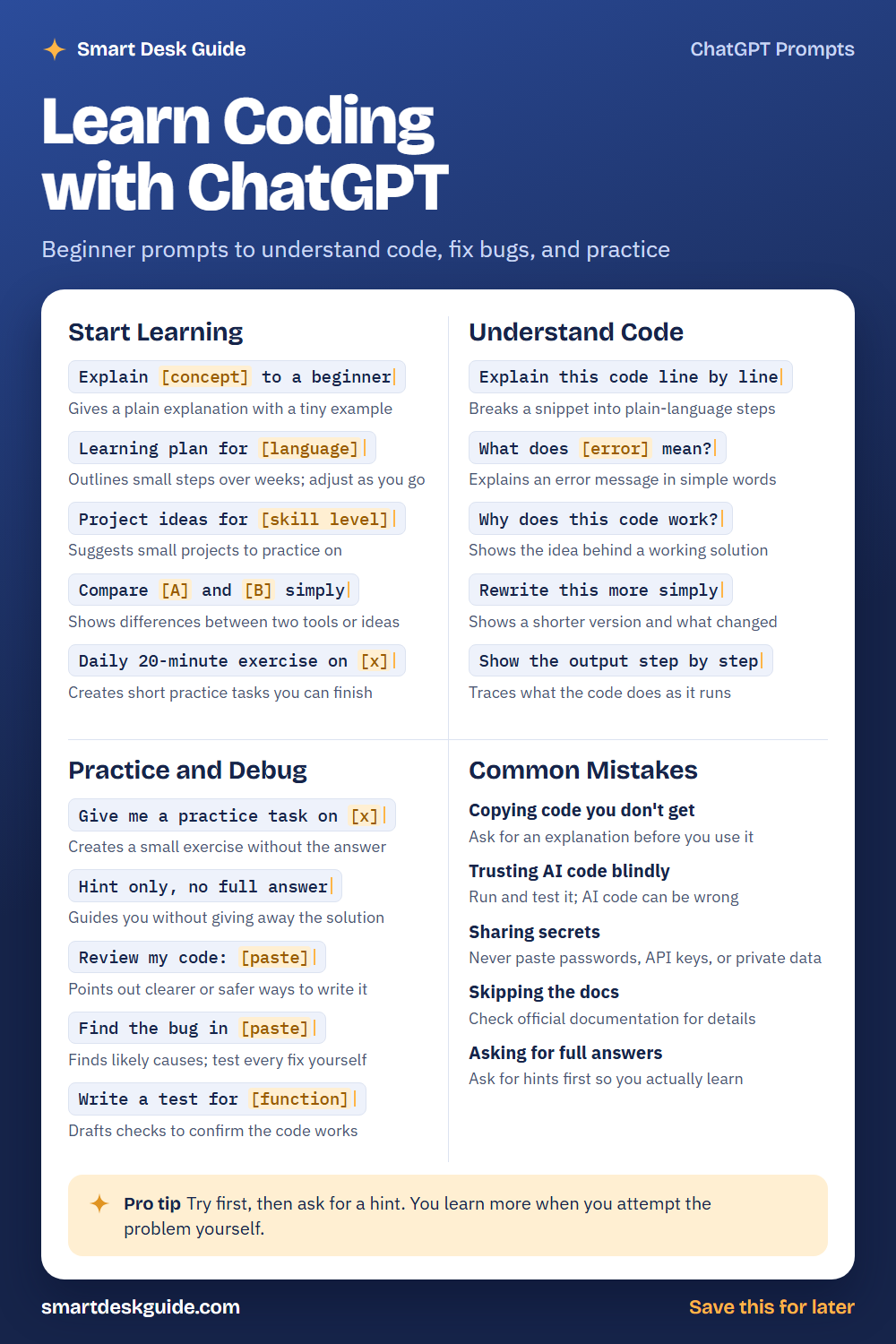
How to Use These Prompts
Words in [brackets] are blanks. Replace each one with your own details before you send the prompt.
Before: Explain [concept] to a beginner
After: Explain what a variable is to a beginner, with a tiny example.
Mention the language you are learning and your level. These prompts work the same way in ChatGPT, Claude, and Gemini. AI code can contain mistakes, so run and test everything, and never paste passwords, API keys, or private data.
Start Learning
Explain [concept] to a beginner
Start with the ideas behind code, such as variables, loops, and functions. Ask for a plain explanation and a very small example. Then try the example yourself and change it.
Example: Explain what a loop is to a beginner learning Python, with a tiny example and a plain-language description of what it does.
Learning plan for [language]
A plan gives your practice a direction. Tell the AI how much time you have each week and what you want to build. Treat the plan as a draft, and adjust it as you learn what works for you.
Example: Learning plan for Python for 6 weeks, 4 hours a week, for someone who wants to automate simple tasks.
Project ideas for [skill level]
Small projects make learning concrete. Ask for ideas that match your level and interests. Choose a project small enough to finish.
Example: Project ideas for a Python beginner who knows variables and loops, each small enough to finish in a weekend.
Compare [A] and [B] simply
Beginners often wonder which tool or language to pick. This prompt compares two options in plain words. Treat the answer as a starting point and look at official documentation for details.
Example: Compare Python and JavaScript simply for someone who wants to learn programming as a first language.
Daily 20-minute exercise on [x]
Short daily practice is easier to keep up than rare long sessions. Ask for small tasks you can finish in about twenty minutes. Do them without the answer first.
Example: Daily 20-minute exercise on Python loops, one small task per day for five days, without answers.
Understand Code
Explain this code line by line
Paste a short piece of code and ask for a line-by-line explanation. It helps you see what each part does. Run the code yourself to confirm.
Example: Explain this code line by line: for i in range(3): print(i)
What does [error] mean?
Error messages can look scary, but they often have clear meanings. Paste the message and the code that caused it, and ask for a simple explanation. Then try the fix yourself.
Example: What does this error mean? TypeError: can only concatenate str (not "int") to str. It happened on this line: print("Age: " + 30)
Why does this code work?
When code works but you are not sure why, ask. Understanding is better than memorizing. Check the explanation by changing the code and seeing what happens.
Example: Why does this code work? total = 0 followed by a loop that adds each number from 1 to 5 to total.
Rewrite this more simply
Sometimes your first solution is long. This prompt shows a simpler version and explains the changes. Make sure you understand the new version before you use it.
Example: Rewrite this more simply and explain what changed: a loop that adds the numbers 1 to 10 one at a time.
Show the output step by step
Tracing a program step by step helps you see how it runs. Ask the AI to write out the values at each step. Then trace it yourself on paper and compare.
Example: Show the output step by step for this code: x = 2, then a loop that doubles x three times and prints it each time.
Practice and Debug
Give me a practice task on [x]
Practice is how skills stick. Ask for a small task without the answer. Try it first, then compare your work with a suggested solution.
Example: Give me a practice task on writing a function that returns the larger of two numbers. Do not include the answer.
Hint only, no full answer
When you are stuck, a hint keeps the learning in your hands. Ask for a small nudge instead of the whole solution. Ask for another hint only if you need it.
Example: Hint only, no full answer: my loop prints the numbers 1 to 4, but I want it to print 1 to 5.
Review my code: [paste]
Paste your own code and ask for feedback. The AI can point out ways to make it clearer or safer. Decide for yourself which suggestions to use.
Example: Review my code and suggest two ways to make it easier to read: a small function that adds two numbers and prints the result.
Find the bug in [paste]
Describe what you expected and what happened, then paste the code. The AI may suggest likely causes. Test every fix yourself, since a suggestion can be wrong.
Example: Find the bug in this function that should add two numbers but returns a different result: def add(a, b): return a - b
Write a test for [function]
Tests check that code does what you intend. Ask for simple tests for a small function. Run them, and make sure you understand what each one checks.
Example: Write a test for a function called add that returns the sum of two numbers. Include three simple cases.
Common Mistakes
Copying code you don’t get
If you paste code you do not understand, you cannot fix it when it breaks. Ask for an explanation first. Quick fix: add Explain each line to your request.
Trusting AI code blindly
AI code can be wrong, outdated, or unsafe. Run it, test it, and read it before you rely on it. Treat it like a draft from a helpful but imperfect assistant.
Sharing secrets
Never paste passwords, API keys, or private data into an AI tool. Replace them with placeholders such as YOUR_KEY_HERE. If you shared a secret by mistake, change it.
Skipping the docs
Official documentation is the best source for how a language or tool really works. Use the AI to understand it, not to replace it. When something matters, look it up.
Asking for full answers
If the AI writes everything for you, you may finish a project and still not know how to code. Ask for hints first. Struggling a little is part of learning.
Pro Tip
Try first, then ask for a hint. You learn more when you attempt the problem yourself, even if your first try does not work.
Example: I tried to write a loop that prints even numbers from 2 to 10, but it prints all the numbers. Here is my code. Give me a hint, not the full answer.
FAQ
Can I learn to code with ChatGPT?
You can use it as a study partner for explanations, practice tasks, and feedback. You also need real practice writing and running code. Combine it with a course or documentation.
Is code from ChatGPT reliable?
Not always. It can contain bugs or outdated approaches. Run and test any code, and check official documentation for anything important.
Which language should I start with?
It depends on what you want to build. Many beginners start with Python or JavaScript. Ask the AI to compare options for your goals, and then try a small project in one of them.
Final Thoughts
A good AI study partner explains, encourages, and helps you practice. But learning to code means writing code, breaking it, and fixing it yourself. Use these prompts to understand and practice, test everything, and keep secrets out of the chat.
If this guide helped, save the cheat sheet on Pinterest and bookmark this page for your next coding session.