Pinterest rewards clear, helpful pins, but writing titles and descriptions for every one takes time. Add board planning and a posting schedule, and it can feel like a full-time job.
This guide gives you ChatGPT prompts for Pinterest that speed up the writing and planning. You will get prompts for pin titles and text, boards and strategy, and driving traffic to your blog or shop, plus the mistakes to avoid. The AI drafts, and you make sure each pin honestly matches its page.
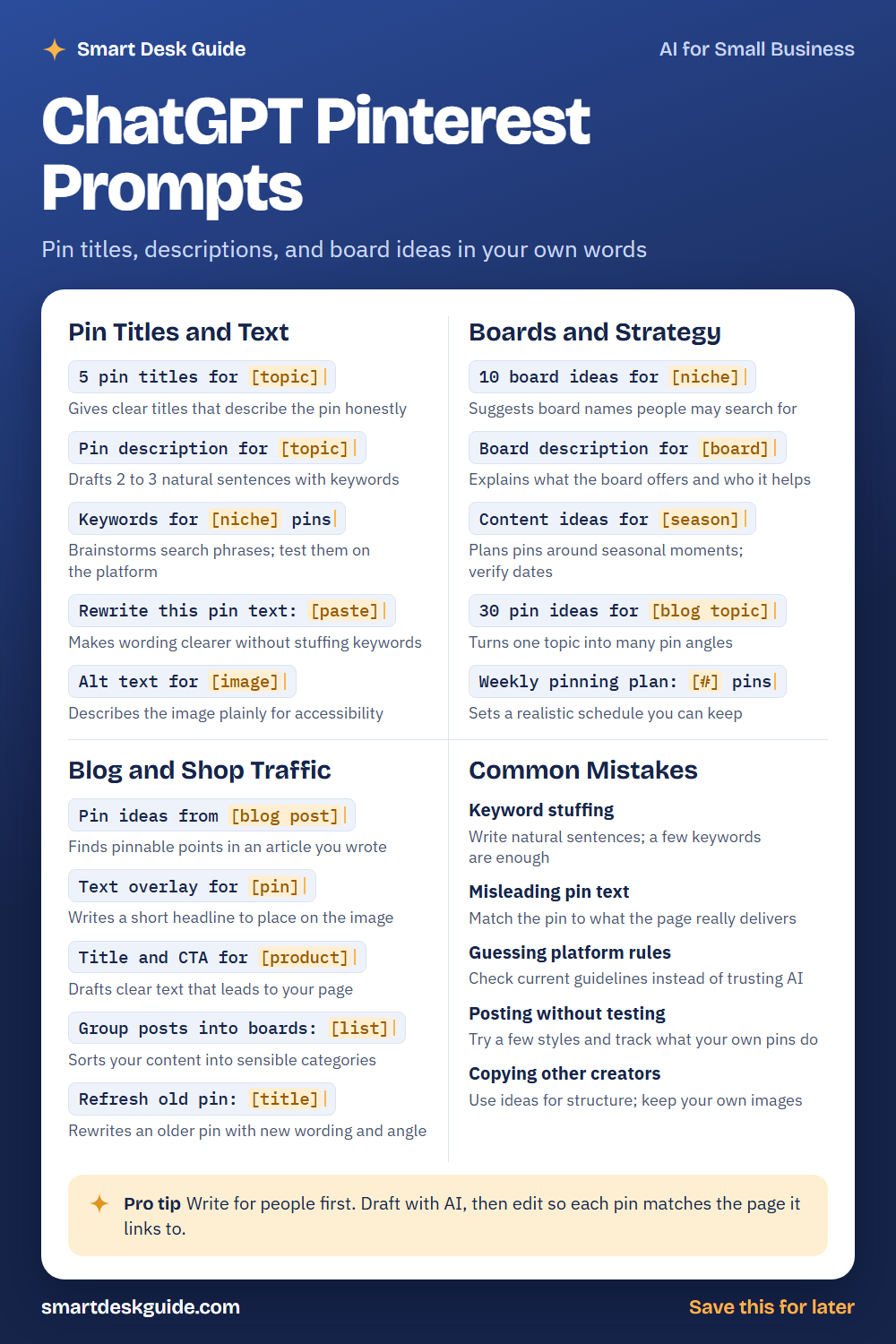
Use the cheat sheet below as a quick reference. Then read on to see when to use each prompt and how it looks filled in.
How to Use These Prompts
Words in [brackets] are blanks. Replace each one with your own details before you send the prompt.
Before: 5 pin titles for [topic]
After: 5 pin titles for a blog post about easy weeknight dinners for busy families.
The more you say about your page, your audience, and your offer, the better the draft. These prompts work the same way in ChatGPT, Claude, and Gemini. The AI does not know Pinterest’s current rules, so check the platform’s guidelines yourself.
Pin Titles and Text
5 pin titles for [topic]
A pin title should tell people what they will find. Ask for several options and pick the one that is clear and honest. Avoid titles that promise more than the page delivers.
Example: 5 pin titles for a blog post about easy weeknight dinners for busy families.
Pin description for [topic]
A description helps people and search understand your pin. Ask for two or three natural sentences that include a keyword or two. Edit it so it reads like something a person would write.
Example: Pin description for a blog post about easy weeknight dinners for busy families. Write 3 natural sentences and end with a soft call to action.
Keywords for [niche] pins
Keywords help describe what a pin is about. The AI can brainstorm phrases people might search, but it cannot see real data. Test the ideas on the platform and watch what appears in search suggestions.
Example: Keywords for home organization pins, including phrases a beginner might search.
Rewrite this pin text: [paste]
Pin text can get crowded with keywords. This prompt makes it clearer and more natural. Compare the new version with the original to make sure it still describes the page.
Example: Rewrite this pin text to sound natural: Easy dinner ideas dinner recipes quick dinner recipes family dinner ideas weeknight.
Alt text for [image]
Alt text describes an image for people who use screen readers. Describe what is actually in the picture in plain words. Do not stuff it with keywords.
Example: Alt text for an image of a sheet pan with roasted chicken and vegetables on a wooden table.
Boards and Strategy
10 board ideas for [niche]
Boards organize your pins by theme. Ask for board names that people may search for, and choose the ones that fit your content. Keep the names clear instead of clever.
Example: 10 board ideas for a blog about family meals, such as quick dinners and kid-friendly lunches.
Board description for [board]
A board description explains what the board offers and who it helps. Give the AI the board name and a few words about the content. Keep it short and natural.
Example: Board description for a board called "Quick Weeknight Dinners," under 40 words.
Content ideas for [season]
Seasonal ideas give you a reason to create new pins. Ask for ideas tied to a season or holiday. Verify dates yourself, since the AI can be wrong.
Example: Content ideas for fall for a blog about family meals, with a few holiday angles to verify.
30 pin ideas for [blog topic]
One blog post can become many pins with different angles. Ask for a list of pin ideas, such as tips, lists, and questions. Pick the ones that fit the page.
Example: 30 pin ideas for a blog post about meal prepping on Sundays, each with a different angle.
Weekly pinning plan: [#] pins
A plan helps you stay consistent without burning out. Tell the AI how many pins you can make each week and ask for a simple schedule. Adjust it to your real time.
Example: Weekly pinning plan: 10 pins, spread across three boards, for a family meals blog.
Blog and Shop Traffic
Pin ideas from [blog post]
Your own posts hold many pinnable ideas. Paste a short summary or outline and ask for angles. Use only angles that match what the page really covers.
Example: Pin ideas from this blog post summary: five weeknight dinners that take under 30 minutes and use one pan.
Text overlay for [pin]
Text on a pin image should be short and easy to read. Ask for a handful of headline options. Choose one that fits the image and is true to the page.
Example: Text overlay for a pin about one-pan dinners, with options under 8 words.
Title and CTA for [product]
If you sell something, pins can lead to your page. Ask for a clear title and a simple call to action. Make sure the pin matches what the product page offers.
Example: Title and CTA for a printable weekly meal planner sold in a small online shop.
Group posts into boards: [list]
If you have many posts, sorting them into boards keeps things tidy. Paste your post titles and ask for sensible groupings. Rename boards so they make sense to visitors.
Example: Group posts into boards: One-pan chicken dinner, Sunday meal prep tips, Easy lunchbox ideas, Pasta night recipes, Freezer-friendly meals.
Refresh old pin: [title]
Older pins can be updated with new wording and a new angle. Give the AI the old title and the page topic. Keep the pin honest and matched to the page.
Example: Refresh old pin: "Easy Dinner Ideas." The page is now an updated list of 15 weeknight dinners. Suggest a new title and description.
Common Mistakes
Keyword stuffing
Cramming a description with keywords makes it hard to read. Write natural sentences, and use a few relevant keywords. Quick fix: read the description aloud, and cut anything that sounds forced.
Misleading pin text
A pin that promises something the page does not deliver frustrates visitors. Match the pin to what the page really offers. Honest pins build trust over time.
Guessing platform rules
AI may not know Pinterest’s current guidelines or features. Check the platform’s official help pages instead of trusting a chatbot. Rules can change.
Posting without testing
Try a few styles and see what works for your own account. Track results over time rather than guessing. Your numbers are a better guide than general advice.
Copying other creators
Looking at other pins for ideas is fine. Copying their text or images is not. Use ideas for structure, and keep your own words and images.
Pro Tip
Write for people first. Draft with AI, then edit so each pin matches the page it links to, and check that the page delivers what the pin promises.
Example: Here is my blog post summary and a draft pin title. Tell me if the title promises anything the post does not cover.
FAQ
Can ChatGPT write Pinterest descriptions?
Yes. It can draft titles, descriptions, and board ideas. You should edit them to sound natural, make sure they match the page, and check Pinterest’s guidelines yourself.
Can ChatGPT do Pinterest keyword research?
It can brainstorm phrases, but it cannot see real search data. Test the ideas on the platform and look at search suggestions. Treat the AI list as a starting point.
How many pins should I make for one post?
There is no single right number. Create a few different pins for a post, each with its own angle, and see what works. Keep quality ahead of quantity.
Final Thoughts
AI can cut the time you spend writing pin text and planning boards, but the pins that last are the ones that honestly help the people who click. Use these prompts to draft, then match each pin to its page. Check platform rules, and keep private information out of the chat.
If this guide helped, save the cheat sheet on Pinterest and bookmark this page for your next batch of pins.