Most days start with a long list and no clear order. You know there is too much to do, but you are not sure what comes first or what will actually fit.
This guide gives you ChatGPT prompts for daily planning that turn that list into a plan. You will get prompts to schedule your day, break big tasks into steps, review and reset, and avoid the mistakes that make plans fall apart by lunchtime.
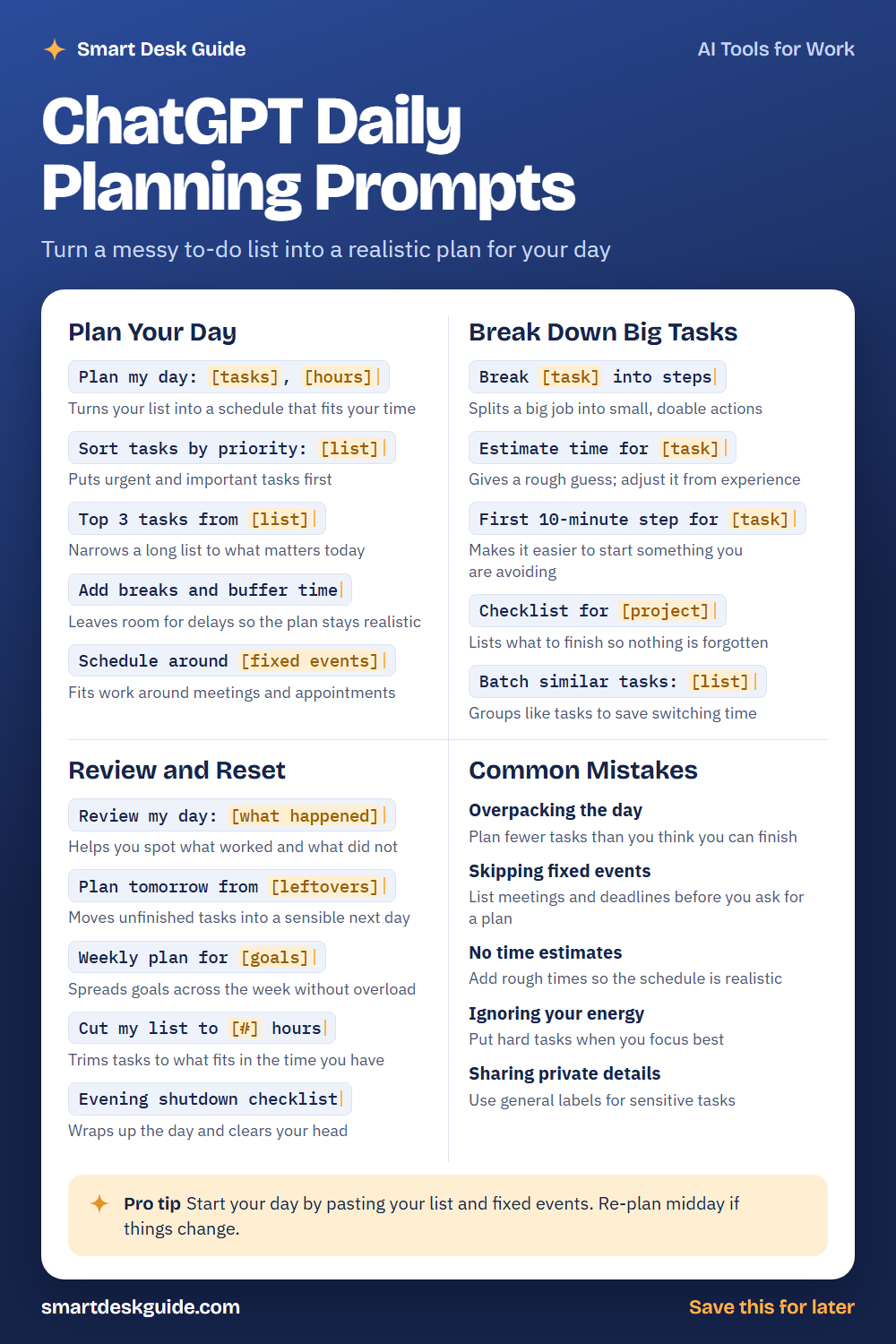
Use the cheat sheet below as a quick reference. Then read on to see when to use each prompt and how it looks filled in.
How to Use These Prompts
Words in [brackets] are blanks. Replace each one with your own details before you send the prompt.
Before: Plan my day: [tasks], [hours]
After: Plan my day: reply to emails, write the weekly report, call the dentist, go grocery shopping. I have 6 free hours.
The more honestly you describe your tasks, your fixed events, and your time, the more realistic the plan will be. These prompts work the same way in ChatGPT, Claude, and Gemini. Treat the schedule as a draft and change it to fit your day.
Plan Your Day
Plan my day: [tasks], [hours]
Start here when your list feels like a pile. Give the AI your tasks and the time you really have. Ask it to put them in an order that makes sense.
Example: Plan my day: reply to emails, write the weekly report, call the dentist, go grocery shopping. I have 6 free hours between 9 a.m. and 5 p.m.
Sort tasks by priority: [list]
Not every task is equally urgent or important. This prompt ranks your list so the most important items come first. Tell the AI how you define priority, such as deadlines or impact.
Example: Sort tasks by priority, with deadlines first: finish the client report due today, book a haircut, renew the gym membership, answer three emails.
Top 3 tasks from [list]
A long list can feel impossible. This prompt narrows it to the three things that matter most today. Anything else becomes a bonus.
Example: Top 3 tasks from this list: finish the report, book a haircut, clean the garage, answer emails, plan next week's meals.
Add breaks and buffer time
Plans that pack every minute usually fail. Asking for breaks and buffer time makes room for delays and interruptions. Add your own habits, such as a lunch break.
Example: Add breaks and buffer time to this schedule, including a 30-minute lunch and 15 minutes after each meeting.
Schedule around [fixed events]
Meetings and appointments cannot move, so build the plan around them. List them with times first. Then ask the AI to fit the rest into the gaps.
Example: Schedule around a team meeting at 10 a.m. and a dentist appointment at 3 p.m. Fit in the report, emails, and a walk.
Break Down Big Tasks
Break [task] into steps
Big tasks are easy to put off because they feel vague. This prompt splits one into small steps you can finish. Review the steps and add any you know are missing.
Example: Break "plan a small birthday dinner for six" into steps I can do over three days.
Estimate time for [task]
Time estimates keep a schedule honest. The AI can give a rough guess, but you know your own pace. Adjust the numbers based on past experience.
Example: Estimate time for writing a two-page weekly report, answering 15 emails, and reviewing a spreadsheet.
First 10-minute step for [task]
Starting is often the hardest part. This prompt finds a tiny first step so you can begin without pressure. Once you start, you may keep going.
Example: First 10-minute step for starting my tax paperwork folder, which I have been avoiding.
Checklist for [project]
A checklist helps make sure nothing is forgotten. Ask for the main items from start to finish. Remove anything that does not apply to you.
Example: Checklist for moving into a new apartment next month, grouped by before, during, and after the move.
Batch similar tasks: [list]
Switching between different kinds of tasks takes effort. Grouping similar ones, like calls or errands, can save time. Ask the AI to group your list.
Example: Batch similar tasks: call the bank, email the landlord, pick up dry cleaning, buy stamps, call the vet.
Review and Reset
Review my day: [what happened]
A short review helps you learn from the day. Tell the AI what you finished, what you did not, and what got in the way. Ask for one small change for tomorrow.
Example: Review my day: I finished the report and emails, but skipped the walk and ran out of time for groceries because a meeting ran long.
Plan tomorrow from [leftovers]
Unfinished tasks need a home. This prompt moves them into a sensible plan for tomorrow. Tell the AI about new commitments so the plan stays realistic.
Example: Plan tomorrow from these leftovers: groceries, haircut booking, and two emails. I have a 2 p.m. meeting.
Weekly plan for [goals]
A weekly view keeps your goals from getting lost in daily tasks. Give the AI your goals and fixed events, and ask for a light plan across the week. Leave some days less full.
Example: Weekly plan for finishing a client report, exercising three times, and cooking at home four nights.
Cut my list to [#] hours
Some days have less time than you hoped. This prompt trims your list to what fits. Tell it what must stay and what can move.
Example: Cut my list to 3 hours. The report must stay, and everything else can move to tomorrow.
Evening shutdown checklist
A shutdown routine marks the end of the workday. Ask for a short checklist, such as writing tomorrow’s top tasks and closing open tabs. Adjust it to your life.
Example: Evening shutdown checklist that takes 10 minutes, for someone who works from home.
Common Mistakes
Overpacking the day
Plans fail when they have too much in them. Plan fewer tasks than you think you can finish. Quick fix: ask the AI to remove two items and leave open space.
Skipping fixed events
If you forget a meeting or appointment, the plan breaks. List fixed events with times before you ask for a schedule. That way the AI builds around them.
No time estimates
A list without time estimates is only a wish list. Add rough times to each task, even if they are guesses. Then adjust as you learn.
Ignoring your energy
You may focus best in the morning or later in the day. Tell the AI when you feel sharpest, and put hard tasks there. Save easy tasks for low-energy times.
Sharing private details
You do not need to share sensitive details to get a plan. Use general labels such as doctor visit or personal errand. Keep names, medical details, and account numbers out of the chat.
Pro Tip
Start your day by pasting your list and fixed events. Re-plan midday if things change, and keep the plan flexible rather than perfect.
Example: It's 1 p.m. and my 11 a.m. meeting ran long. Here is what is left on my list. Re-plan the afternoon and move anything that will not fit to tomorrow.
FAQ
Can ChatGPT plan my day?
Yes. Give it your tasks, your fixed events, and the time you have, and it can draft a schedule. You still know your energy and your real pace, so adjust the plan to fit.
What should I include in my prompt?
List your tasks, the times of fixed events, how much time you have, and what matters most. Add when you focus best, if you know. More honest detail leads to a more realistic plan.
How do I stop my plan from falling apart?
Plan fewer tasks, add buffer time, and review each evening. Treat the plan as a guide and change it when things happen. A small, flexible plan is easier to follow.
Final Thoughts
A good daily plan is realistic, flexible, and kind to your energy. Use these prompts to sort your list, break big tasks into steps, and review your day. Keep private information out of the chat, and adjust the plan whenever life changes.
If this guide helped, save the cheat sheet on Pinterest and bookmark this page for your next busy morning.