SEO work has many small tasks: finding keywords, planning headings, writing titles, and describing images. Each one is simple, but together they take a lot of time.
This guide gives you ChatGPT prompts for SEO that speed up the planning and writing steps. You will get prompts for keyword ideas, content briefs, and on-page text, plus the mistakes to avoid. AI can help you draft, but it cannot replace real search data or your own expertise.
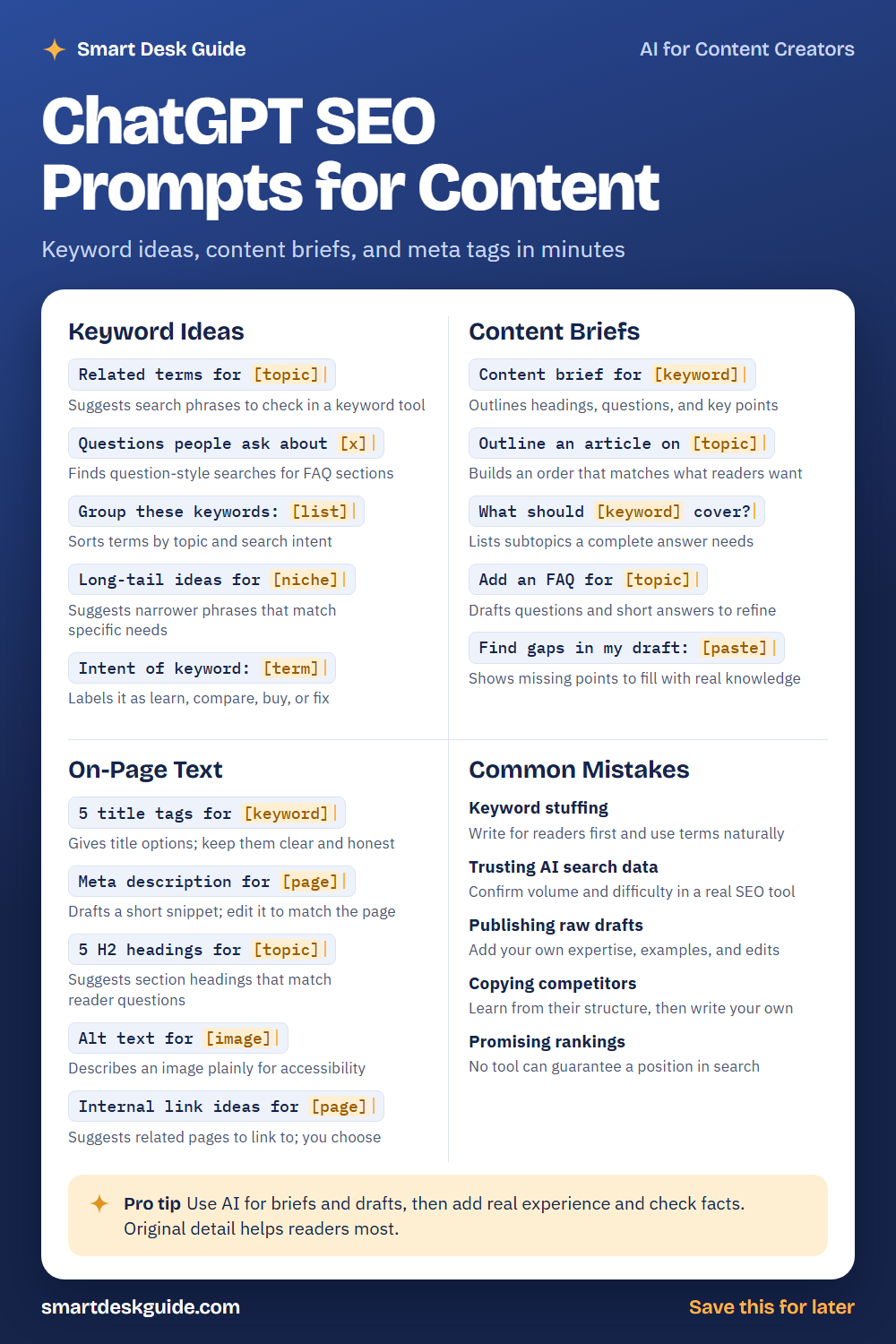
Use the cheat sheet below as a quick reference. Then read on to see when to use each prompt and how it looks filled in.
How to Use These Prompts
Words in [brackets] are blanks. Replace each one with your own details before you send the prompt.
Before: Related terms for [topic]
After: Related terms for beginner pottery classes.
The more you say about your site, your reader, and your goal, the better the results. These prompts work the same way in ChatGPT, Claude, and Gemini. Treat every suggestion as an idea to check, and confirm search data in a trusted SEO tool.
Keyword Ideas
Related terms for [topic]
Use this to widen a topic into phrases people might search. The AI is guessing based on language patterns, not real search data. Check promising terms in a keyword tool before you build content around them.
Example: Related terms for beginner pottery classes, including phrases a first-timer might search.
Questions people ask about [x]
Question-style searches make good FAQ sections and article ideas. This prompt lists questions a beginner might ask. Compare them with real questions from your customers or comments.
Example: Questions people ask about choosing a first pottery wheel.
Group these keywords: [list]
A long list is easier to use when it is sorted. Paste your terms and ask the AI to group them by topic and search intent. Review the groups, since the AI can misjudge what a phrase means.
Example: Group these keywords by topic: pottery classes near me, clay for beginners, how to glaze pottery, best kiln for home, pottery gift ideas.
Long-tail ideas for [niche]
Long-tail phrases are longer and more specific, like a full question or a particular need. They can match what a reader wants more closely. Ask for ideas, then pick those that fit your site.
Example: Long-tail ideas for a small pottery studio that teaches weekend classes.
Intent of keyword: [term]
Search intent is the reason behind a search. Someone may want to learn, compare, buy, or fix something. Knowing the intent helps you choose the right type of page.
Example: Intent of keyword: how to glaze pottery at home. Label it as learn, compare, buy, or fix and explain why.
Content Briefs
Content brief for [keyword]
A brief gives a writer a clear plan. Ask for the main headings, questions to answer, and key points. Add your own knowledge before you write.
Example: Content brief for "how to center clay on a wheel," aimed at beginners. Include headings, questions to answer, and key points.
Outline an article on [topic]
An outline puts ideas in an order that makes sense to a reader. Ask for headings that follow the questions readers have. Move or delete anything that does not fit your site.
Example: Outline an article on choosing the right clay for a first pottery project.
What should [keyword] cover?
Use this to check that your page is complete. The AI lists subtopics a good answer might include. Add only what you can speak about accurately.
Example: What should a page about "pottery glaze safety tips" cover for beginners?
Add an FAQ for [topic]
A short FAQ can answer extra questions on the same page. Ask for questions and brief answers, then edit them for accuracy. Replace any guesses with facts you know.
Example: Add an FAQ for a page about weekend pottery classes, with 4 questions and 2-sentence answers.
Find gaps in my draft: [paste]
Paste your draft and ask what is missing. The AI may point out unanswered questions or unclear steps. Fill gaps with real details, not filler.
Example: Find gaps in my draft: Pottery glaze needs to be applied evenly. Dip the piece quickly and let it dry before firing.
On-Page Text
5 title tags for [keyword]
A title tag is the headline that can show in search results. Ask for options that are clear and honest about the page. Keep them readable, and avoid stuffing in extra keywords.
Example: 5 title tags for a page about weekend pottery classes for beginners, each under 60 characters.
Meta description for [page]
A meta description is a short summary that may appear under your title in search. Ask for a draft that describes the page truthfully. Edit it so it matches what readers will find.
Example: Meta description for a page about our beginner pottery classes. Keep it under 155 characters and end with a clear benefit.
5 H2 headings for [topic]
Headings help readers scan and help you plan sections. Ask for headings that match reader questions. Choose or adapt the ones that fit your outline.
Example: 5 H2 headings for a guide on getting started with hand-built pottery.
Alt text for [image]
Alt text describes an image for people who use screen readers and appears if an image fails to load. Describe what is actually in the picture. Keep it plain and short.
Example: Alt text for an image of a beginner shaping a clay bowl on a wooden table.
Internal link ideas for [page]
Internal links connect related pages on your site. Give the AI your page topic and a list of your other pages, and ask which ones fit. You decide which links help the reader.
Example: Internal link ideas for a page about glaze basics. Related pages: clay types, kiln safety, studio class schedule.
Common Mistakes
Keyword stuffing
Repeating a phrase again and again makes writing hard to read. Write for readers first and use terms where they fit. Quick fix: read your text aloud and cut anything that sounds forced.
Trusting AI search data
The AI cannot see real search volume or difficulty. Confirm numbers in a trusted SEO tool. Use the AI for ideas and wording, not for data.
Publishing raw drafts
Pages that add nothing new are less helpful to readers. Add your own expertise, examples, and edits before you publish. A real detail only you know makes a page stronger.
Copying competitors
Looking at other pages can show what readers expect. Learn from the structure, then write your own content in your own words. Do not copy another site’s text.
Promising rankings
No tool or prompt can guarantee a position in search. Be honest with clients, teammates, and yourself. Focus on useful content and steady improvement.
Pro Tip
Use AI for briefs and drafts, then add real experience and check facts. Original detail helps readers most, and it keeps your pages from sounding like everyone else’s.
Example: Here is my outline. Draft only the intro in about 80 words, then list three places where I should add a personal example or photo.
FAQ
Can ChatGPT do SEO for me?
It can help with ideas, outlines, and draft text. It cannot access real search data or guarantee results. You still need to confirm keywords in a tool and write content that helps readers.
Is AI-written content bad for SEO?
Quality and usefulness matter more than how a draft started. Pages that are accurate, original, and helpful serve readers better. Edit AI drafts, add your own knowledge, and check facts.
How do I find keywords with AI?
Ask for related terms, questions, and long-tail phrases. Then check them in a keyword tool and compare them with what your audience really asks. Treat the AI list as a starting point.
Final Thoughts
AI can speed up planning and drafting, but good SEO still depends on useful pages and reliable data. Use these prompts for ideas, confirm numbers in a real tool, and add your own experience to every page.
If this guide helped, save the cheat sheet on Pinterest and bookmark this page for your next content plan.